Learning Kubernetes - Understanding the History of Application Deployment and Kubernetes
In this episode, we will explore the history of application deployment from infrastructure, the transition from VMs to containers, from monolithic to microservice deployment, and the history of Kubernetes.

#Introduction
After preparing the necessary skills in episode 0, in this episode we'll explore the history of application deployment and the history of Kubernetes itself. Understanding the history of application deployment and Kubernetes is important because it helps us understand why Kubernetes technology exists.
#Evolution of Infrastructure Models
 Architecture & Deployment Models 1
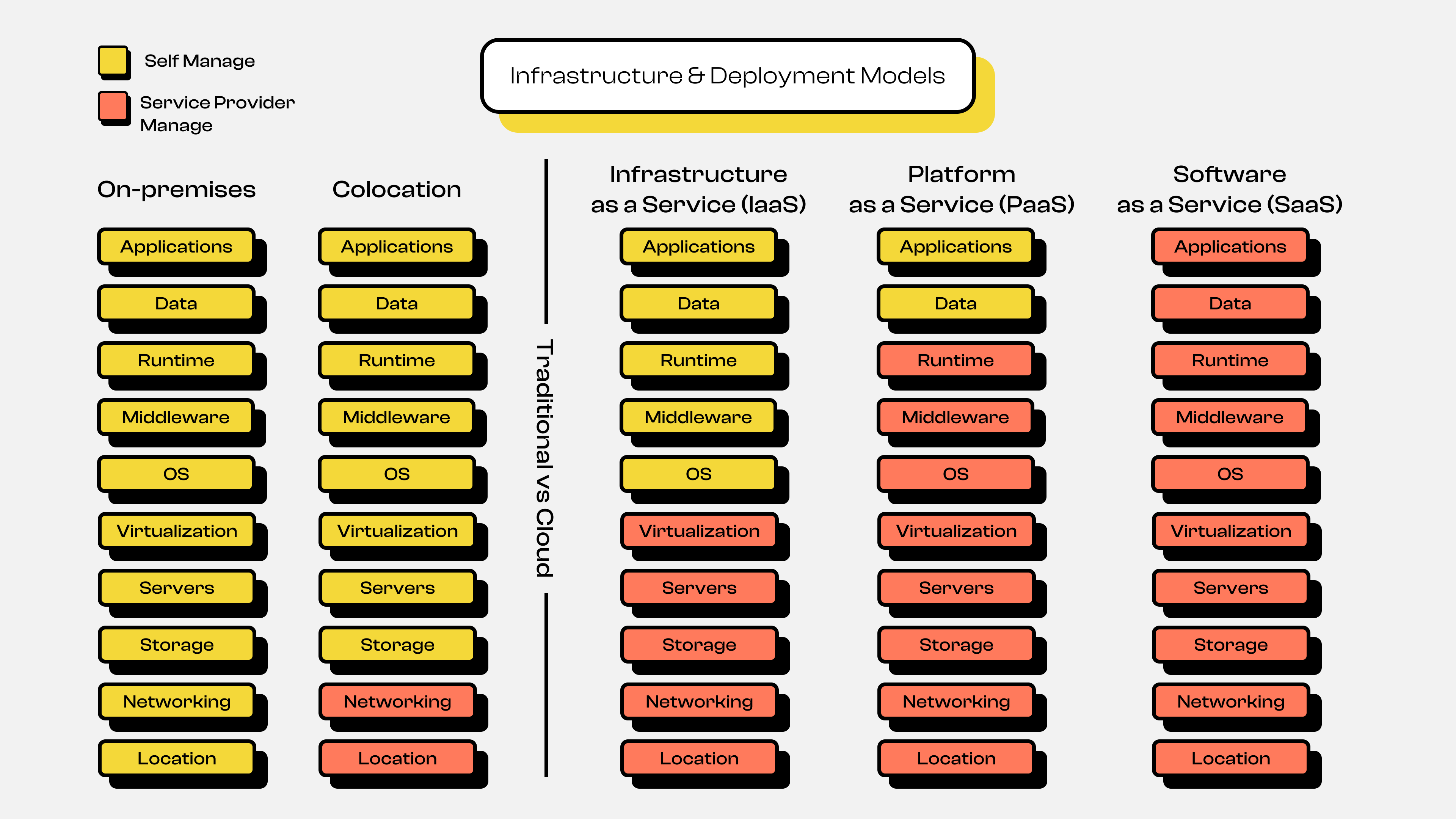
You can see the infrastructure evolution diagram above, which shows several stages: starting from On-Premise / Self Hosting, then moving to the Colocation Server era, and finally to today's Cloud Computing era. Here's a detailed explanation of each infrastructure evolution shown in the diagram.
#On-Premise or Self Hosting
In the early days, all companies stored and ran their applications on their own servers, commonly called on-premise. They had to purchase hardware first, install it in their own server room, maintain it independently, and scale or expand it manually. This process had many drawbacks and challenges, such as:
- High costs
Companies or individuals had to allocate large budgets upfront to purchase physical servers. This would be very difficult for companies or individuals with limited funds or startups.
- High risk
It would be very difficult to perform maintenance or management without knowledgeable personnel, and this would inevitably require hiring many people across various fields. For example, people who understand hardware installation including network cables, power consumption levels, room temperature maintenance, and much more.
- Limited scalability
If you've read the initial explanation and points 1 and 2, you can probably imagine how difficult it would be to scale. For example, suppose a startup company was doing fine with just 1 server, but a few years later the business grows. Naturally, the workload on the server increases, so we have no choice but to expand by adding more servers. This means repeating the entire process from the beginning: purchasing hardware, installation, and maintenance again.
In essence, the On-Premise / Self Hosting infrastructure model requires us to manage everything ourselves, from location, hardware, to software.
Note: Although it may seem outdated and rigid, this type of infrastructure model is still relevant today. Why? Because some companies typically want to keep their internal data secure, and so on.
#Colocation
After understanding how complicated On-Premise / Self Hosting infrastructure is, Colocation Server emerged. Colocation essentially abstracts several layers from the On-Premise / Self Hosting model. In colocation servers, we still need to buy or own our own server hardware, but we no longer need to worry about preparing and managing the room where the server is installed. So we can say we're sharing or placing our server in a colocation service provider's datacenter. This means that in terms of room management (electricity, room temperature, etc.) and networking, things are better. However, in terms of scaling and managing the software inside, it still requires manual time and effort.
#Cloud Computing
Next comes the Cloud Computing era, where this infrastructure model abstracts many layers from previous models, both On-Premise and Colocation. The early history of cloud computing became popular in 2006 when Amazon Web Service (AWS) opened a service where software or applications could be hosted or stored on their own servers, with guaranteed quality, such as 99.9% uptime guarantee and so on. This was followed by other cloud providers offering similar services, such as Google with Google Cloud Platform (GCP) and Microsoft with Microsoft Azure.
In this cloud computing infrastructure model, there are 3 main parts or services provided:
- Infrastructure as a Service (IaaS)
In this service, the provider abstracts from location, hardware, networking, storage, to the virtualization level. So as users, we only need to focus on managing the operating system and application level. Some examples of this service at cloud providers are AWS EC2, Google Compute Engine, and so on.
- Platform as a Service (PaaS)
After understanding IaaS, next comes PaaS. Essentially, this service abstracts from IaaS services like the Operating System (OS) and even to the Runtime or programming language level. So as users, we only need to focus on building the application and managing application data. For example, if you create an application using Golang, NodeJS, PHP, or others, you only need to focus on building the application itself. The OS setup, Runtime, and so on are already managed by the cloud provider. Usually the application will be in the form of a container or sandbox. Some examples of this service at cloud providers are Google Cloud Run, Google App Engine, AWS Lambda, AWS Fargate, and so on.
Note: Platform as a Service or PaaS is also commonly called Serverless. The term "Serverless" is not without basis, but rather strongly supported by the type of service offered, where we no longer need to manage the server even at the operating system level. "Serverless" doesn't mean there's no server, but rather that server management is hidden from the user.
Usually this type of service uses a
Pay as You Gopayment model, where we only pay based on usage.For example, if we have a Web App or RESTful API deployed on PaaS like Google Cloud Run, the billing is based on the traffic accessing the Web App or RESTful API. So if no one accesses it, the service won't be used because the container can scale down to 0.
- Software as a Service (SaaS)
Just like PaaS abstracts from IaaS services, SaaS essentially abstracts from PaaS services, so it's fully managed by the provider. You might not realize that you actually use SaaS services frequently. Examples of this service include Gmail, Outlook, YouTube, and so on. As users, we no longer need to prepare server infrastructure, operating systems, data, or even application development.
#Evolution of Application Architecture and Deployment Models
After understanding the evolution of infrastructure models from On-Premise to Colocation to Cloud Computing, let's move on to the evolution of application architecture models. To visualize this better, look at the following diagram:
#Architecture
 Architecture & Deployment Models 3
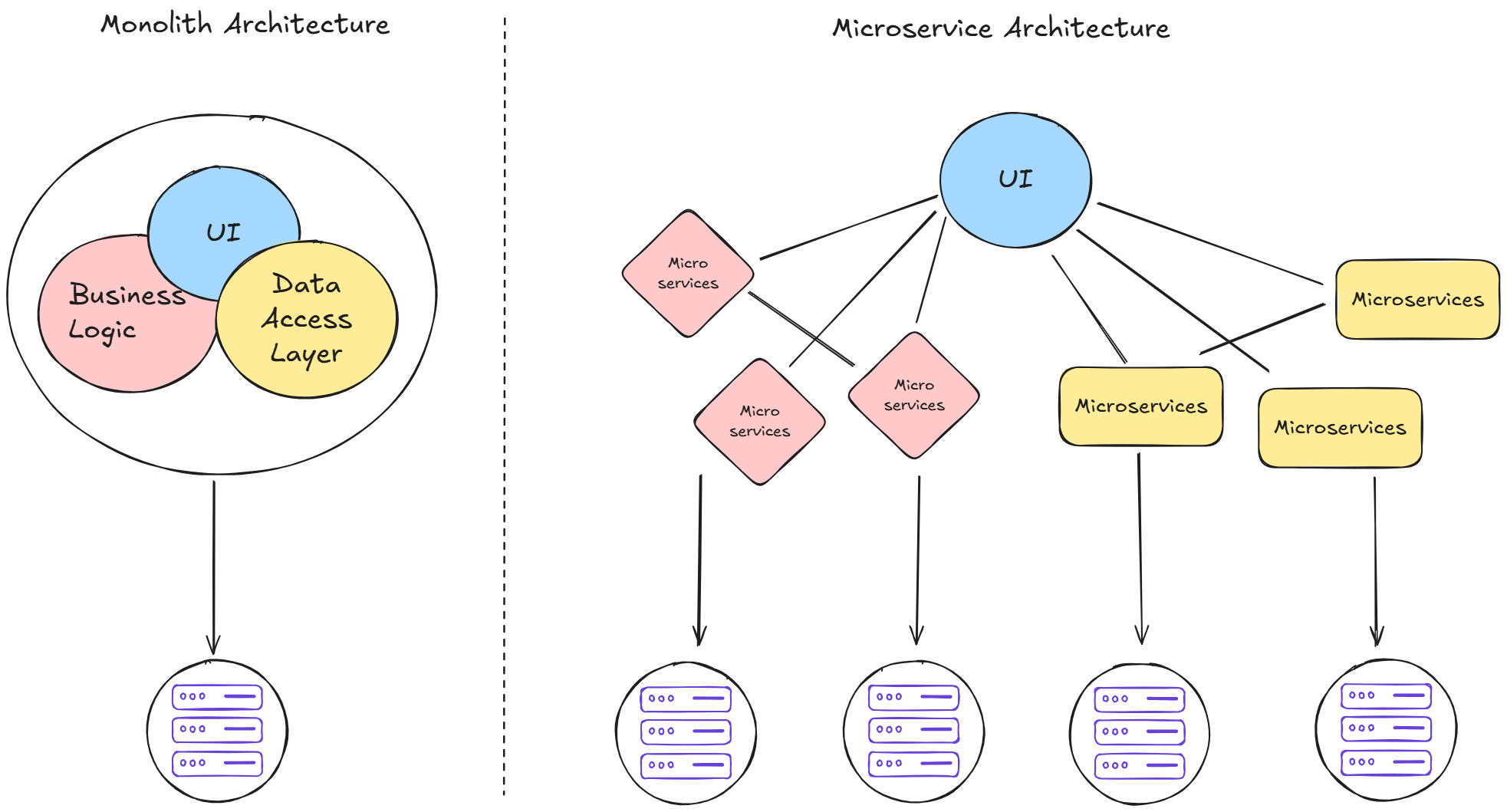
In the diagram above, you can see two types of application architecture: Monolith Architecture and Microservices Architecture. Here's the explanation:
#Monolith Architecture
In the past, applications were developed and deployed as one large package. All components from User Interface (UI), Authentication, Database, API, Business Logic, to Data Access Layer were one unified whole. This architecture has several advantages and disadvantages:
- Easy to deploy
Since all components are together, we don't need to worry about connections between different parts of the application.
- Difficult to manage as the application grows
The more complex the application, the harder it is to manage. Changing logic in one feature can impact other features. Additionally, if many developers work on one project, the risk of conflicts and errors increases.
- Single Point of Failure
If one feature encounters an error, it could cause the entire application to go down due to a domino effect.
#Microservices Architecture
To address the challenges of monolithic architecture, the Microservices Architecture concept emerged. Here, the application is broken down into small services based on their individual functions. For example, the authentication service has its own database, is developed by its own team, and can be deployed independently without depending on other services.
However, microservices also introduce new challenges:
- Coordination between services
Since the application is now deployed separately across services, it becomes very difficult for us to manage how services coordinate or communicate with each other.
- Managing deployment of each service
In addition to the difficulty of managing service coordination and communication, we also face great difficulty managing the deployment of each service. There will certainly be many services that need to be deployed and managed.
Despite these challenges, microservices offer significant advantages:
- The application becomes easier to manage
Since each service is separate, changes in one service don't affect other services. Each service can even use different programming languages or frameworks.
- The application follows single responsibility principle
This is very helpful when many developers are building the application. With microservices architecture, each developer doesn't need to read or understand all the code in the application. Developers can focus on developing a specific service, and if there's an error, we don't need to worry about who handles it because it's already divided per team according to the service's work.
- The application doesn't have a single point of failure
Unlike monolithic architecture, applications developed using microservices architecture don't have the single point of failure weakness. For example, when the payment service goes down, it doesn't cause the entire application to go down. Only the payment service is down, while other services like authentication continue to run normally.
Note: Architecture selection can't just follow trends. Each approach has its own advantages and disadvantages. Choose an architecture based on application requirements, team size, and the complexity of the system you want to develop.
#Deployment
In addition to architectural evolution, there's also evolution in deployment. This might seem like a step back to the infrastructure evolution discussion, but don't worry—this discussion is still relevant to architectural evolution.
 Architecture & Deployment Models 2
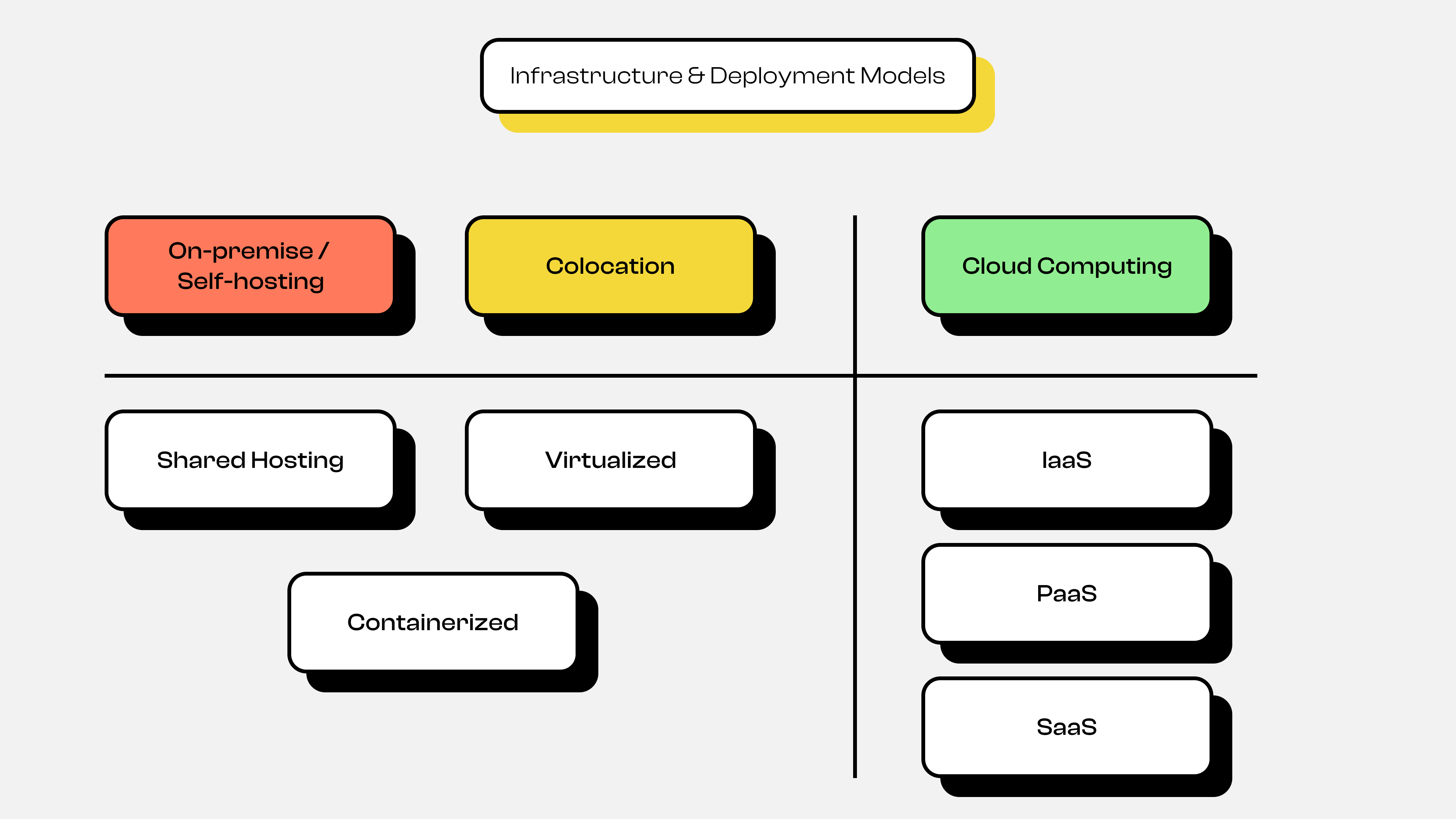
You can see in the diagram above that there are 2 types of application deployment: On-Premise or Self Hosting + Colocation, and Cloud Computing. Here's a detailed explanation of each deployment evolution shown in the diagram.
#On-Premise or Self Hosting and Colocation
In the past, applications were deployed in several ways:
- Shared Hosting
In this deployment approach, the application is stored by sharing computing resources with other users. If you're familiar with it, one example is cPanel. Each application shares resources with other applications or users to serve traffic from clients.
- Virtualized & Containerized
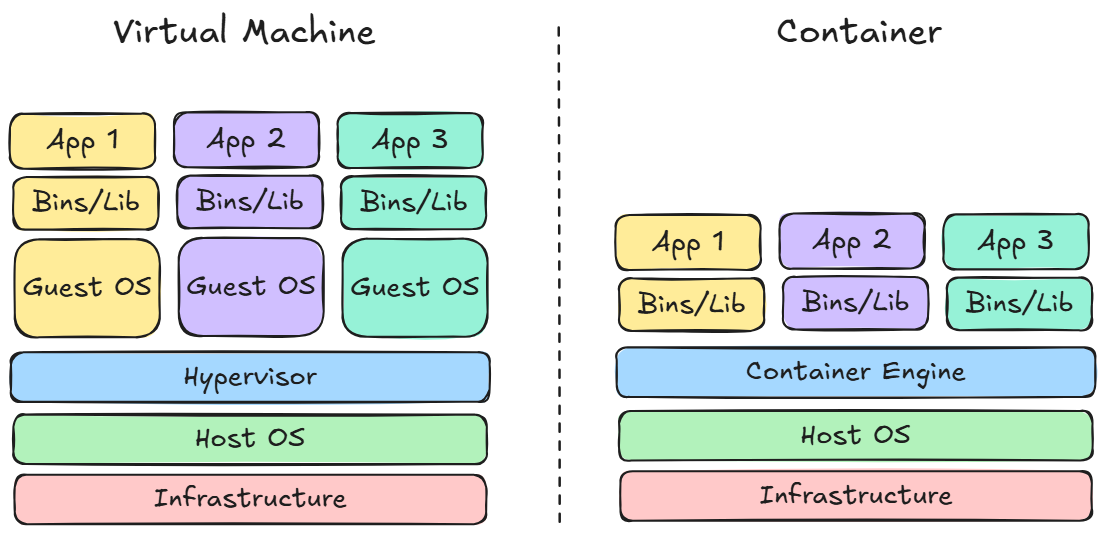 Architecture & Deployment Models 4
Unlike shared hosting, deployment using Virtualization is more exclusive because typically one user has one machine, so there's no longer resource or computing sharing with other users. If you're familiar with it, one example is Virtual Private Server (VPS). So applications deployed using Virtualization can serve client traffic better than shared hosting because they no longer share resources or computing with other applications.
Although virtualization deployment is more exclusive, it still has weaknesses. It's very inconvenient to scale applications because we need to create virtual machines, set up the OS, and set up the application. Although we could address this by creating VM templates, booting still takes a very long time.
Because of this, another solution emerged: Containerization. Containerization abstracts the Operating System (OS) layer that exists in Virtual Machines, making it very easy to scale applications and much faster in terms of booting. Container-based deployment is what became the foundation for Kubernetes.
#Cloud Computing Deployment
As explained earlier in the infrastructure evolution, there are 3 main types of services provided by cloud providers: IaaS, PaaS, and SaaS. Essentially, cloud computing abstracts each layer based on the type of service, so we no longer need to manage it manually. Although the technology behind these services is essentially the same as Virtual Machines and Containerization.
Note: Just like architecture selection, the choice of deployment type also depends on requirements and circumstances when developing the application. So there's no one solution that's definitely right and others wrong, because each deployment type has its own pros and cons.
#New Problem: Managing Many Containers
Since we'll be learning Kubernetes, our choice of architecture and deployment will likely lean toward microservices and containers. However, this will certainly be very inconvenient for us to manage many containers. For example, suppose a feature has 3 replicas. We'd need to create 3 identical containers for that feature. And that's just one feature—imagine the entire application with all its features! Besides that, there are several other problems, such as:
- Each service needs its own isolated container
- For each container, we need to know which ones are running, crashed, overloaded, and so on
- How to scale containers
- How to perform health checks on containers
- What if there's a deployment failure and we need to rollback, and so on
Because of this, a new solution emerged: container orchestration technology. One technology that aims to solve these problems is Kubernetes.
#History of Kubernetes
Google has been running hundreds of millions of containers per week using their internal system called Borg. This technology was later developed further and renamed to Omega. This technology managed things like automated scaling and container deployment at Google. Then in 2014, Google recreated this container orchestrator system but as an open-source version based on their internal experience, and named it Kubernetes.
#Fun Facts
- The name
Kubernetescomes from Greek meaning "Ship Captain" or "Helmsman" or "Pilot" - The logo symbol is a ship's wheel with 7 sides, because there were 7 original engineers.
- Kubernetes is now managed by the Cloud Native Computing Foundation (CNCF) and is the most popular open-source project in the cloud infrastructure world.
#Conclusion
Kubernetes was born from a long evolutionary journey spanning infrastructure, architecture, and application deployment. Kubernetes emerged because of the complexity of microservices and containers that require an automated management system. Kubernetes wasn't the first solution, but it's currently the most widely adopted solution.
Wasn't episode 1 interesting? We've covered the evolution from the beginning to the birth of Kubernetes 😅. Make sure your enthusiasm is still there, because in the next episode 2, we'll start diving into Kubernetes Concepts and Architecture. So stay motivated 😁.