Learning Kubernetes - Introduction and Explanation of Service
In this episode, we'll discuss Kubernetes Service, the fundamental networking abstraction for exposing applications. We'll learn about Service types, how they enable Pod communication, and best practices for service discovery.


#Introduction
In the previous episode, we learned about working with multiple resources using the all keyword. In episode 18, we'll discuss Service, one of the most fundamental concepts in Kubernetes networking.
Note: Here I'll be using a Kubernetes Cluster installed through K3s.
Pods in Kubernetes are ephemeral - they can be created, destroyed, and recreated with different IP addresses. Service provides a stable endpoint for accessing Pods, abstracting away the dynamic nature of Pod IPs and enabling reliable communication between application components.
#What Is Service?
A Service in Kubernetes is an abstraction that defines a logical set of Pods and a policy for accessing them. Services enable network access to a set of Pods, providing a stable IP address and DNS name even as Pods are created and destroyed.
Think of Service like a load balancer with service discovery - it maintains a stable endpoint while automatically routing traffic to healthy Pods that match its selector. When Pods come and go, the Service automatically updates its list of endpoints.
Key characteristics of Service:
- Stable endpoint - Provides consistent IP and DNS name
- Load balancing - Distributes traffic across multiple Pods
- Service discovery - Enables Pods to find each other via DNS
- Label selector - Automatically discovers Pods with matching labels
- Multiple types - ClusterIP, NodePort, LoadBalancer, ExternalName
- Port mapping - Maps service ports to Pod ports
- Session affinity - Optional sticky sessions
#Why Do We Need Service?
Service solves several critical networking challenges:
- Dynamic Pod IPs - Pods get new IPs when recreated; Service provides stable endpoint
- Load balancing - Distributes traffic across multiple Pod replicas
- Service discovery - Applications can find each other using DNS names
- Decoupling - Frontend doesn't need to know backend Pod IPs
- External access - Exposes applications outside the cluster
- Health checking - Only routes to healthy Pods
- Port abstraction - Service port can differ from Pod port
Without Service, you would need to:
- Track Pod IPs manually
- Implement your own load balancing
- Update configurations when Pods change
- Handle Pod failures manually
#Service Types
Kubernetes provides four Service types:
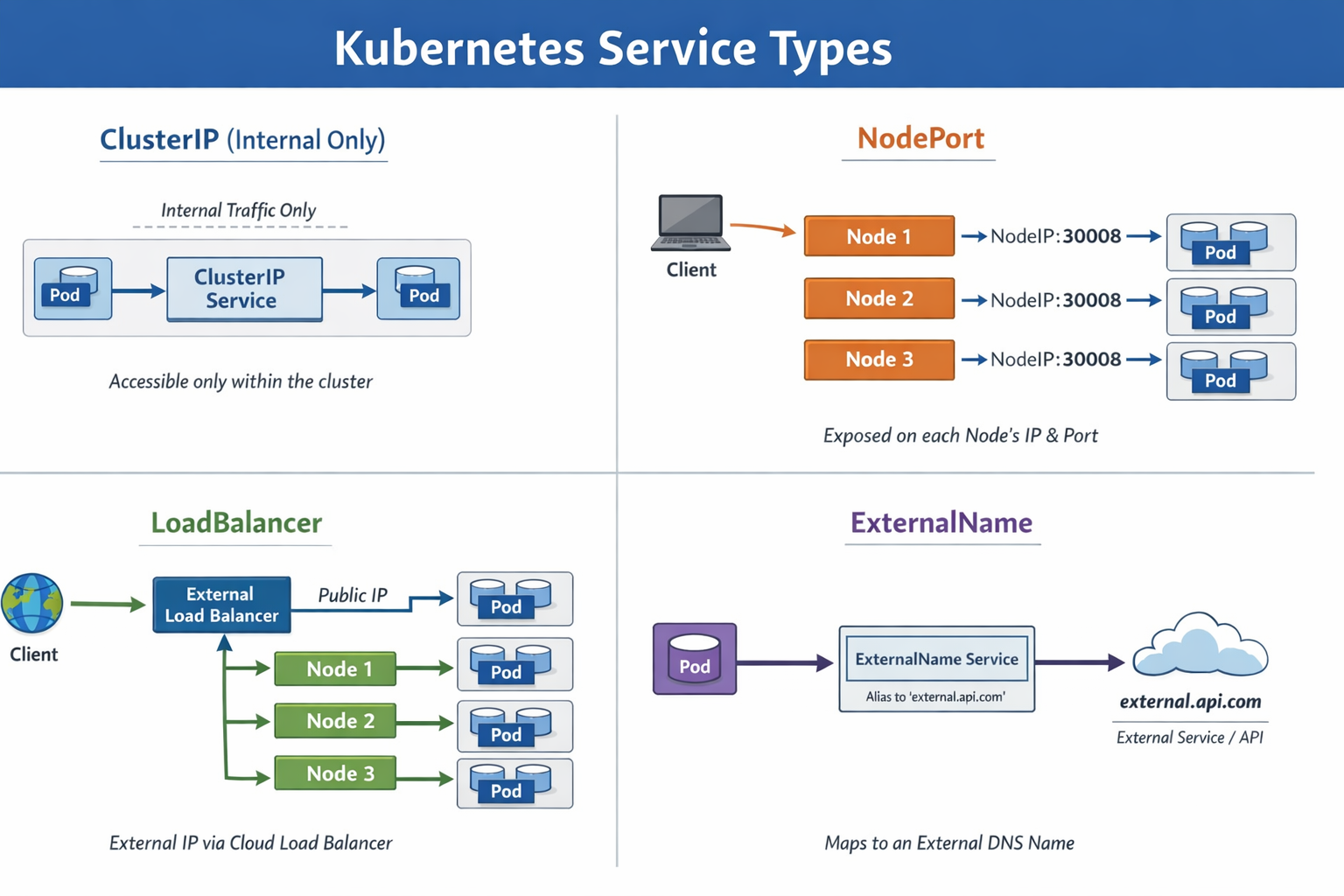 Type of Service LB L4
#ClusterIP (Default)
Exposes Service on a cluster-internal IP. Service is only accessible within the cluster.
Use case: Internal communication between microservices
#NodePort
Exposes Service on each Node's IP at a static port. Makes Service accessible from outside the cluster.
Use case: Development, testing, or when LoadBalancer is unavailable
#LoadBalancer
Exposes Service externally using a cloud provider's load balancer.
Use case: Production external access in cloud environments
#ExternalName
Maps Service to an external DNS name.
Use case: Accessing external services with Kubernetes DNS
#Creating a ClusterIP Service
ClusterIP is the default Service type for internal cluster communication.
#Example 1: Basic ClusterIP Service
First, create a Deployment:

apiVersion: apps/v1
kind: Deployment
metadata:
    name: nginx-deployment
spec:
    replicas: 3
    selector:
        matchLabels:
            app: nginx
    template:
        metadata:
            labels:
                app: nginx
        spec:
            containers:
                - name: nginx
                  image: nginx:1.25
                  ports:
                      - containerPort: 80
Apply the Deployment:
sudo kubectl apply -f nginx-deployment.ymlCreate a ClusterIP Service:
apiVersion: v1
kind: Service
metadata:
    name: nginx-service
spec:
    type: ClusterIP
    selector:
        app: nginx
    ports:
        - protocol: TCP
          port: 80
          targetPort: 80
Apply the Service:
sudo kubectl apply -f nginx-service-clusterip.ymlVerify the Service:
sudo kubectl get service nginx-serviceOutput:
NAME            TYPE        CLUSTER-IP      EXTERNAL-IP   PORT(S)   AGE
nginx-service   ClusterIP   10.43.100.50    <none>        80/TCP    30s
The Service gets a stable ClusterIP (10.43.100.50) that won't change.
#Testing ClusterIP Service
Test the Service from within the cluster:
# Create a test Pod
sudo kubectl run test-pod --image=curlimages/curl:latest --rm -it -- sh

# Inside the Pod, test the Service
curl http://nginx-service
curl http://nginx-service.default.svc.cluster.local
The Service load balances requests across all three nginx Pods.
#Service Discovery with DNS
Kubernetes automatically creates DNS records for Services.
#DNS Format
Services can be accessed using these DNS names:
Within same namespace:
<service-name>From different namespace:
<service-name>.<namespace>Fully qualified domain name (FQDN):
<service-name>.<namespace>.svc.cluster.local#Example: DNS Service Discovery
apiVersion: v1
kind: Service
metadata:
    name: backend
    namespace: production
spec:
    selector:
        app: backend
    ports:
        - port: 8080
          targetPort: 8080
Frontend Pods can access this Service using:
backend(if in same namespace)backend.production(from different namespace)backend.production.svc.cluster.local(FQDN)
#Creating a NodePort Service
NodePort exposes Service on each Node's IP at a static port (30000-32767).
#Example: NodePort Service
apiVersion: v1
kind: Service
metadata:
    name: nginx-nodeport
spec:
    type: NodePort
    selector:
        app: nginx
    ports:
        - protocol: TCP
          port: 80
          targetPort: 80
          nodePort: 30080
Apply the Service:
sudo kubectl apply -f nginx-service-nodeport.ymlVerify:
sudo kubectl get service nginx-nodeportOutput:
NAME             TYPE       CLUSTER-IP      EXTERNAL-IP   PORT(S)        AGE
nginx-nodeport   NodePort   10.43.100.51    <none>        80:30080/TCP   30s
Access the Service from outside the cluster:
curl http://<node-ip>:30080Important
Important: NodePort Services are accessible on ALL nodes in the cluster, even if the Pod isn't running on that node. Kubernetes routes traffic to the appropriate node.
#Creating a LoadBalancer Service
LoadBalancer creates an external load balancer (in supported cloud environments).
#Example: LoadBalancer Service
apiVersion: v1
kind: Service
metadata:
    name: nginx-loadbalancer
spec:
    type: LoadBalancer
    selector:
        app: nginx
    ports:
        - protocol: TCP
          port: 80
          targetPort: 80
Apply the Service:
sudo kubectl apply -f nginx-service-loadbalancer.ymlVerify:
sudo kubectl get service nginx-loadbalancerOutput (in cloud environment):
NAME                 TYPE           CLUSTER-IP      EXTERNAL-IP      PORT(S)        AGE
nginx-loadbalancer   LoadBalancer   10.43.100.52    203.0.113.10     80:31234/TCP   2m
The EXTERNAL-IP is the public IP provided by the cloud load balancer.
Note
Note: LoadBalancer type requires cloud provider support (AWS, GCP, Azure). In local clusters like Minikube or K3s, you may need MetalLB or similar solutions.
If you are using K3s, Service with LoadBalancer type will automatically be handled by Klipper like this
#Port Configuration
#Port Fields
ports:
    - protocol: TCP
      port: 80          # Service port (what clients connect to)
      targetPort: 8080  # Pod port (where container listens)
nodePort: 30080 # Node port (for NodePort/LoadBalancer)- port: The port the Service listens on
- targetPort: The port on the Pod (can be port number or name)
- nodePort: The port on each Node (NodePort/LoadBalancer only)
#Example: Different Port Mapping
apiVersion: v1
kind: Service
metadata:
    name: api-service
spec:
    selector:
        app: api
    ports:
        - name: http
          protocol: TCP
          port: 80
          targetPort: 8080
        - name: https
          protocol: TCP
          port: 443
          targetPort: 8443
This Service:
- Listens on port 80, forwards to Pod port 8080
- Listens on port 443, forwards to Pod port 8443
#Using Named Ports
Define named ports in Pods:
apiVersion: v1
kind: Pod
metadata:
    name: web-pod
    labels:
        app: web
spec:
    containers:
        - name: web
          image: nginx:1.25
          ports:
              - name: http
                containerPort: 80
              - name: metrics
                containerPort: 9090
Reference named ports in Service:
apiVersion: v1
kind: Service
metadata:
    name: web-service
spec:
    selector:
        app: web
    ports:
        - name: http
          port: 80
          targetPort: http
        - name: metrics
          port: 9090
targetPort: metrics#Session Affinity
Control whether requests from the same client go to the same Pod.
#ClientIP Session Affinity
apiVersion: v1
kind: Service
metadata:
    name: sticky-service
spec:
    selector:
        app: web
    sessionAffinity: ClientIP
    sessionAffinityConfig:
        clientIP:
            timeoutSeconds: 10800
    ports:
        - port: 80
          targetPort: 80
With sessionAffinity: ClientIP, requests from the same client IP go to the same Pod for the specified timeout (default 10800 seconds = 3 hours).
#Headless Service
A Service without a ClusterIP, used for direct Pod-to-Pod communication.
#Example: Headless Service
apiVersion: v1
kind: Service
metadata:
    name: database
spec:
    clusterIP: None
    selector:
        app: database
    ports:
        - port: 5432
          targetPort: 5432
With clusterIP: None, DNS returns Pod IPs directly instead of a Service IP.
Use case: StatefulSets where each Pod needs a stable identity.
#Service Without Selector
Create a Service that doesn't automatically select Pods.
#Example: Manual Endpoints
apiVersion: v1
kind: Service
metadata:
    name: external-database
spec:
    ports:
        - port: 5432
          targetPort: 5432
Manually create Endpoints:
apiVersion: v1
kind: Endpoints
metadata:
    name: external-database
subsets:
    - addresses:
          - ip: 192.168.1.100
      ports:
          - port: 5432
Use case: Accessing external services or databases outside Kubernetes.
#ExternalName Service
Map a Service to an external DNS name.
#Example: ExternalName Service
apiVersion: v1
kind: Service
metadata:
    name: external-api
spec:
    type: ExternalName
    externalName: api.example.com
Pods can access external-api which resolves to api.example.com.
Use case: Abstracting external service URLs, making it easy to change them later.
#Practical Examples
#Example 1: Microservices Architecture
Frontend, backend, and database services:
# Frontend Service (LoadBalancer for external access)
apiVersion: v1
kind: Service
metadata:
    name: frontend
spec:
    type: LoadBalancer
    selector:
        app: frontend
    ports:
        - port: 80
          targetPort: 3000
---
# Backend Service (ClusterIP for internal access)
apiVersion: v1
kind: Service
metadata:
    name: backend
spec:
    type: ClusterIP
    selector:
        app: backend
    ports:
        - port: 8080
          targetPort: 8080
---
# Database Service (Headless for StatefulSet)
apiVersion: v1
kind: Service
metadata:
    name: database
spec:
    clusterIP: None
    selector:
        app: database
    ports:
        - port: 5432
targetPort: 5432#Example 2: Multi-Port Service
Application with HTTP and metrics endpoints:
apiVersion: v1
kind: Service
metadata:
    name: app-service
spec:
    selector:
        app: myapp
    ports:
        - name: http
          port: 80
          targetPort: 8080
        - name: metrics
          port: 9090
          targetPort: 9090
        - name: health
          port: 8081
targetPort: 8081#Example 3: Environment-Specific Services
Different services for different environments:
# Production Service
apiVersion: v1
kind: Service
metadata:
    name: api
    namespace: production
spec:
    selector:
        app: api
        environment: production
    ports:
        - port: 80
          targetPort: 8080
---
# Staging Service
apiVersion: v1
kind: Service
metadata:
    name: api
    namespace: staging
spec:
    selector:
        app: api
        environment: staging
    ports:
        - port: 80
targetPort: 8080#Viewing Service Details
#Get Services
sudo kubectl get servicesOr shorthand:
sudo kubectl get svc#Describe Service
sudo kubectl describe service nginx-serviceOutput shows:
Name:              nginx-service
Namespace:         default
Labels:            <none>
Annotations:       <none>
Selector:          app=nginx
Type:              ClusterIP
IP Family Policy:  SingleStack
IP Families:       IPv4
IP:                10.43.100.50
IPs:               10.43.100.50
Port:              <unset>  80/TCP
TargetPort:        80/TCP
Endpoints:         10.42.0.10:80,10.42.0.11:80,10.42.0.12:80
Session Affinity:  None
Events: <none>#View Endpoints
sudo kubectl get endpoints nginx-serviceOutput:
NAME            ENDPOINTS                                   AGE
nginx-service   10.42.0.10:80,10.42.0.11:80,10.42.0.12:80   5m
Shows the actual Pod IPs the Service routes to.
#Common Mistakes and Pitfalls
#Mistake 1: Selector Mismatch
Problem: Service selector doesn't match Pod labels.
Solution: Ensure labels match exactly:
# Pod labels
labels:
    app: nginx
    version: v1

# Service selector must match
selector:
    app: nginx
version: v1#Mistake 2: Wrong Target Port
Problem: targetPort doesn't match container port.
Solution: Verify container port:
sudo kubectl get pod <pod-name> -o jsonpath='{.spec.containers[*].ports[*].containerPort}'#Mistake 3: Using LoadBalancer Locally
Problem: LoadBalancer pending in local clusters.
Solution: Use NodePort for local development or install MetalLB.
#Mistake 4: Not Checking Endpoints
Problem: Service has no endpoints.
Solution: Check if Pods are running and labels match:
sudo kubectl get endpoints <service-name>
sudo kubectl get pods -l app=<label>#Mistake 5: Forgetting DNS Suffix
Problem: Can't access Service from different namespace.
Solution: Use full DNS name:
<service-name>.<namespace>.svc.cluster.local#Best Practices
#Use Meaningful Service Names
Choose clear, descriptive names:
# Good
name: user-api
name: payment-service
name: database-primary

# Avoid
name: svc1
name: service
name: app#Always Set Resource Limits on Pods
Services route to Pods, so ensure Pods have resource limits:
resources:
    requests:
        memory: "256Mi"
        cpu: "250m"
    limits:
        memory: "512Mi"
cpu: "500m"#Use Named Ports
Makes configuration clearer:
ports:
    - name: http
      port: 80
      targetPort: http
    - name: metrics
      port: 9090
targetPort: metrics#Implement Health Checks
Ensure Services only route to healthy Pods:
livenessProbe:
    httpGet:
        path: /health
        port: 8080
readinessProbe:
    httpGet:
        path: /ready
port: 8080#Use ClusterIP for Internal Services
Don't expose internal services unnecessarily:
# Internal microservice
type: ClusterIP

# Only expose what needs external access
type: LoadBalancer#Document Service Dependencies
Add annotations documenting dependencies:
metadata:
    annotations:
        description: "User API service"
        depends-on: "database, cache"
owner: "backend-team"#Conclusion
In episode 18, we've explored Service in Kubernetes in depth. We've learned what Services are, the different Service types, and how to use them for reliable application networking.
Key takeaways:
- Service provides stable endpoint for accessing Pods
- Four types: ClusterIP (internal), NodePort (node access), LoadBalancer (external), ExternalName (DNS mapping)
- Uses label selectors to automatically discover Pods
- Provides load balancing across multiple Pod replicas
- Enables service discovery via DNS
- ClusterIP is default and most common for internal communication
- Port mapping allows Service port to differ from Pod port
- Session affinity enables sticky sessions
- Headless Services for direct Pod access
- Always verify selector matches Pod labels
- Check endpoints to ensure Service finds Pods
Service is fundamental to Kubernetes networking, enabling reliable communication between application components. By understanding Services, you can build robust, scalable microservices architectures with proper service discovery and load balancing.
Are you getting a clearer understanding of Service in Kubernetes? In the next episode 19, we'll discuss Ingress, which provides sophisticated HTTP/HTTPS routing to Services with features like host-based routing, path-based routing, and TLS termination. Keep your learning momentum going and look forward to the next episode!