Learning Kubernetes - Ingress with Gateway API
In this episode, we'll explore the latest update to Kubernetes Ingress using API Gateway. Learn how to leverage the new Gateway API for more advanced routing, traffic management, and modern ingress patterns.


#Introduction
In the previous episode, we learned about traditional Kubernetes Ingress for HTTP/HTTPS routing. Now in episode 19.1, we'll explore the Gateway API - the next generation of Ingress that provides more expressive, extensible, and role-oriented APIs for managing ingress traffic.
Note: Here I'll be using a Kubernetes Cluster installed through K3s.
The Gateway API is not a replacement for Ingress, but rather an evolution that addresses limitations and provides more advanced capabilities. It's designed to be more expressive, extensible, and portable across different implementations.
#What Is Gateway API?
Gateway API is a collection of Kubernetes resources that model service networking in Kubernetes. It's the successor to the Ingress API, offering improved expressiveness, extensibility, and role-oriented design.
Gateway API was developed by the Kubernetes SIG Network community and graduated to Beta in 2022, with GA (General Availability) for core features in 2023. It provides a more powerful and flexible way to manage ingress traffic compared to traditional Ingress.
Key characteristics of Gateway API:
- Role-oriented - Separates concerns between infrastructure and application teams
- Expressive - More routing capabilities than Ingress
- Extensible - Custom resources and filters
- Portable - Works across different implementations
- Type-safe - Strongly typed API with validation
- Multi-protocol - HTTP, HTTPS, TCP, UDP, gRPC
- Advanced routing - Header-based, query param-based routing
- Traffic splitting - Weighted routing for canary deployments
#Gateway API vs Traditional Ingress
Let's understand the key differences:
| Aspect | Gateway API | Traditional Ingress |
|---|---|---|
| Design | Role-oriented (3 personas) | Single resource |
| Expressiveness | Highly expressive | Limited |
| Protocols | HTTP, HTTPS, TCP, UDP, gRPC | HTTP, HTTPS only |
| Routing | Header, query, method-based | Host and path only |
| Traffic Management | Built-in traffic splitting | Requires annotations |
| Extensibility | Custom filters and resources | Annotation-based |
| Portability | Standardized across providers | Provider-specific |
| Maturity | GA (2023) | GA (2019) |
#Gateway API Architecture
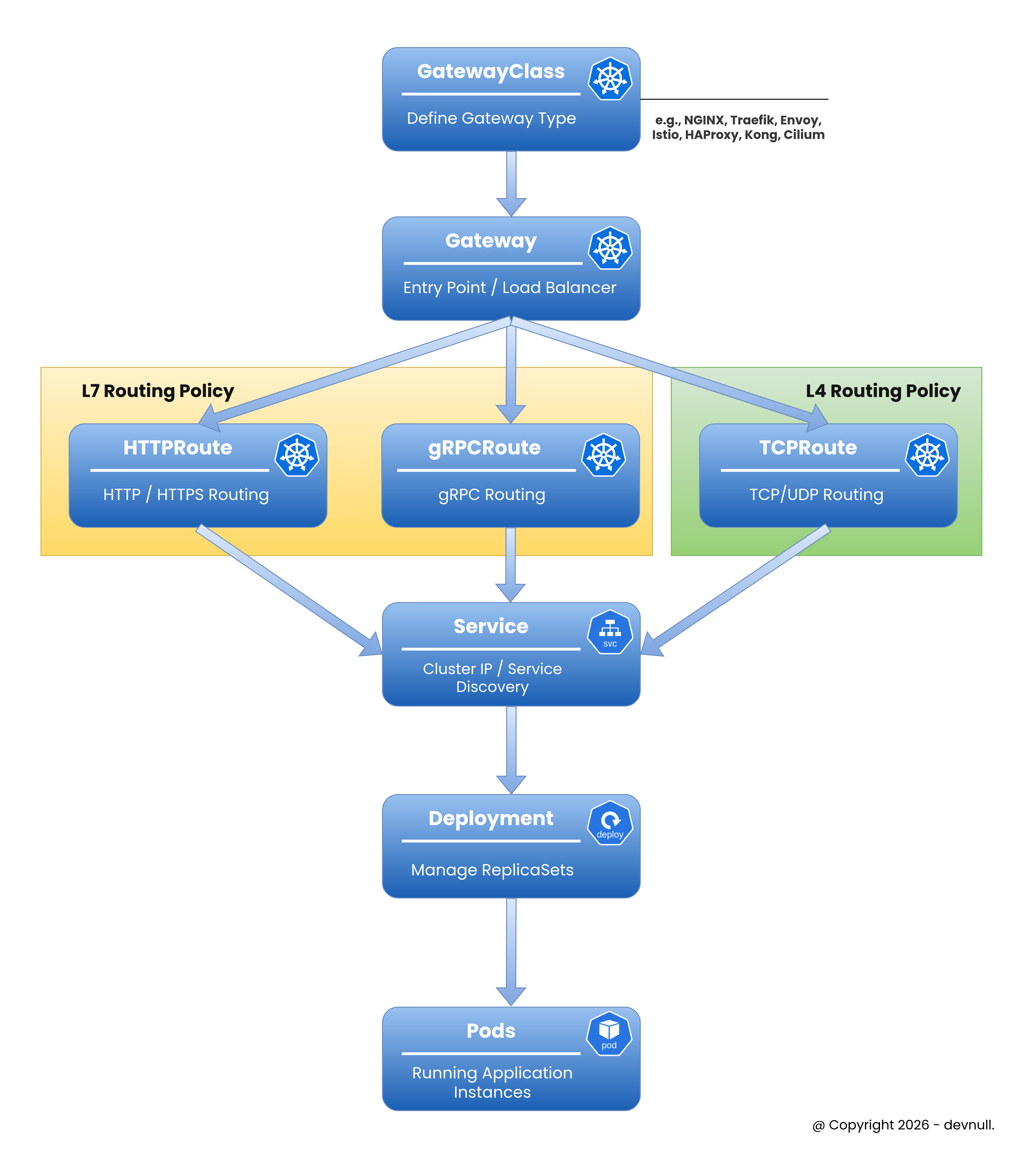
Gateway API introduces three main resources representing different personas:
 Gateway API Concepts
#1. GatewayClass
Defines a class of Gateways (like IngressClass). Managed by infrastructure providers.

apiVersion: gateway.networking.k8s.io/v1
kind: GatewayClass
metadata:
    name: example-gateway-class
spec:
controllerName: example.com/gateway-controller#2. Gateway
Defines how traffic is translated to Services. Managed by cluster operators.
apiVersion: gateway.networking.k8s.io/v1
kind: Gateway
metadata:
    name: example-gateway
spec:
    gatewayClassName: example-gateway-class
    listeners:
        - name: http
          protocol: HTTP
port: 80#3. HTTPRoute
Defines HTTP routing rules. Managed by application developers.
apiVersion: gateway.networking.k8s.io/v1
kind: HTTPRoute
metadata:
    name: example-route
spec:
    parentRefs:
        - name: example-gateway
    rules:
        - matches:
              - path:
                    type: PathPrefix
                    value: /api
          backendRefs:
              - name: api-service
port: 8080#Installing Gateway API
#Step 1: Install Gateway API CRDs
sudo kubectl apply -f https://github.com/kubernetes-sigs/gateway-api/releases/download/v1.0.0/standard-install.yamlVerify installation:
sudo kubectl get crd | grep gatewayOutput:
gatewayclasses.gateway.networking.k8s.io
gateways.gateway.networking.k8s.io
httproutes.gateway.networking.k8s.io
referencegrants.gateway.networking.k8s.io#Step 2: Install Gateway Controller
For this example, we'll use NGINX Gateway Fabric:
sudo kubectl apply -f https://github.com/nginxinc/nginx-gateway-fabric/releases/download/v1.1.0/crds.yaml
sudo kubectl apply -f https://github.com/nginxinc/nginx-gateway-fabric/releases/download/v1.1.0/nginx-gateway.yaml
Verify controller:
sudo kubectl get pods -n nginx-gateway#Creating Your First Gateway
#Step 1: Create GatewayClass
apiVersion: gateway.networking.k8s.io/v1
kind: GatewayClass
metadata:
    name: nginx
spec:
    controllerName: gateway.nginx.org/nginx-gateway-controller
Apply:
sudo kubectl apply -f gateway-class.yml#Step 2: Create Gateway
apiVersion: gateway.networking.k8s.io/v1
kind: Gateway
metadata:
    name: example-gateway
    namespace: default
spec:
    gatewayClassName: nginx
    listeners:
        - name: http
          protocol: HTTP
          port: 80
          allowedRoutes:
              namespaces:
                  from: Same
Apply:
sudo kubectl apply -f gateway.ymlVerify:
sudo kubectl get gatewayOutput:
NAME              CLASS   ADDRESS         READY   AGE
example-gateway nginx 203.0.113.10 True 30s#Step 3: Create Application and Service
apiVersion: apps/v1
kind: Deployment
metadata:
    name: web-app
spec:
    replicas: 3
    selector:
        matchLabels:
            app: web
    template:
        metadata:
            labels:
                app: web
        spec:
            containers:
                - name: nginx
                  image: nginx:1.25
                  ports:
                      - containerPort: 80
---
apiVersion: v1
kind: Service
metadata:
    name: web-service
spec:
    selector:
        app: web
    ports:
        - port: 80
          targetPort: 80
Apply:
sudo kubectl apply -f app.yml#Step 4: Create HTTPRoute
apiVersion: gateway.networking.k8s.io/v1
kind: HTTPRoute
metadata:
    name: web-route
spec:
    parentRefs:
        - name: example-gateway
    hostnames:
        - "web.example.com"
    rules:
        - matches:
              - path:
                    type: PathPrefix
                    value: /
          backendRefs:
              - name: web-service
                port: 80
Apply:
sudo kubectl apply -f http-route.ymlVerify:
sudo kubectl get httprouteNow traffic to web.example.com routes through the Gateway to web-service.
Tip
If you are using K3s, which comes with Traefik as the default Ingress Controller, and you want to try running the Gateway API, you can follow these steps:
- Disable the built-in Traefik (because modifying its config directly will keep getting overridden when want to enable Gateway API feature)
sudo nvim /etc/rancher/k3s/config.yaml- Restart K3s
sudo systemctl restart k3s- Setup
kubeconfigso you don’t need to use sudo
mkdir -p ~/.kube
sudo cp /etc/rancher/k3s/k3s.yaml ~/.kube/config
sudo chown $USER:$USER ~/.kube/config- Install Traefik via Helm
helm repo add traefik https://traefik.github.io/charts
helm repo update- Create a Gateway
apiVersion: gateway.networking.k8s.io/v1
kind: Gateway
metadata:
name: web-gateway
spec:
gatewayClassName: traefik
listeners:
    - name: http
    protocol: HTTP
    port: 8000
    hostname: "*.example.com"

    - name: https
    protocol: HTTPS
    port: 8443
    hostname: web.example.com
    tls:
        mode: Terminate
        certificateRefs:
- name: example-tls- Deploy the application using
Deployment,Service, andHTTPRoute
# ================================
# Web Service
# ================================
apiVersion: apps/v1
kind: Deployment
metadata:
name: web-service
spec:
replicas: 3
selector:
    matchLabels:
    app: web-service
template:
    metadata:
    labels:
        app: web-service
    spec:
    containers:
        - name: web-service
        image: ghcr.io/armandwipangestu/web-service:1.0.1
        ports:
            - containerPort: 3000
---
apiVersion: v1
kind: Service
metadata:
name: web-service
spec:
selector:
    app: web-service
ports:
    - port: 80
    targetPort: 3000
---
apiVersion: gateway.networking.k8s.io/v1
kind: HTTPRoute
metadata:
name: web-service
spec:
parentRefs:
    - name: web-gateway
    sectionName: https
    - name: web-gateway
    sectionName: http
hostnames:
    - "web.example.com"
rules:
    - matches:
        - path:
            type: PathPrefix
            value: /
    backendRefs:
        - name: web-service
        port: 80
Test the connection

curl -k --resolve web.example.com:443:10.10.10.4 https://web.example.com -v#Advanced Routing with Gateway API
#Header-Based Routing
Route based on HTTP headers:
apiVersion: gateway.networking.k8s.io/v1
kind: HTTPRoute
metadata:
    name: header-route
spec:
    parentRefs:
        - name: example-gateway
    rules:
        - matches:
              - headers:
                    - name: X-API-Version
                      value: v2
          backendRefs:
              - name: api-v2-service
                port: 8080
        - matches:
              - headers:
                    - name: X-API-Version
                      value: v1
          backendRefs:
              - name: api-v1-service
port: 8080#Query Parameter Routing
Route based on query parameters:
apiVersion: gateway.networking.k8s.io/v1
kind: HTTPRoute
metadata:
    name: query-route
spec:
    parentRefs:
        - name: example-gateway
    rules:
        - matches:
              - queryParams:
                    - name: version
                      value: beta
          backendRefs:
              - name: beta-service
                port: 8080
        - matches:
              - queryParams:
                    - name: version
                      value: stable
          backendRefs:
              - name: stable-service
port: 8080#HTTP Method Routing
Route based on HTTP methods:
apiVersion: gateway.networking.k8s.io/v1
kind: HTTPRoute
metadata:
    name: method-route
spec:
    parentRefs:
        - name: example-gateway
    rules:
        - matches:
              - method: POST
                path:
                    type: PathPrefix
                    value: /api
          backendRefs:
              - name: write-service
                port: 8080
        - matches:
              - method: GET
                path:
                    type: PathPrefix
                    value: /api
          backendRefs:
              - name: read-service
port: 8080#Traffic Splitting and Canary Deployments
Gateway API makes traffic splitting simple:
#Weighted Traffic Distribution
After that we can test using command curl like this
for i in {1..200}; do
  curl -sk --resolve canary.example.com:443:10.10.10.4 https://canary.example.com
done | jq -r '.version' | sort | uniq -cThis sends 90% of traffic to alpha version and 10% to beta version.
#Progressive Canary Rollout
# Phase 1: 5% canary
apiVersion: gateway.networking.k8s.io/v1
kind: HTTPRoute
metadata:
    name: app-route
spec:
    parentRefs:
        - name: example-gateway
    rules:
        - backendRefs:
              - name: stable-service
                port: 80
                weight: 95
              - name: canary-service
                port: 80
                weight: 5
Update weights progressively: 5% → 25% → 50% → 100%
#TLS Configuration
Configure HTTPS with Gateway API:
#Step 1: Create TLS Secret
sudo kubectl create secret tls example-tls \
    --cert=path/to/tls.crt \
--key=path/to/tls.key#Step 2: Configure Gateway with TLS
apiVersion: gateway.networking.k8s.io/v1
kind: Gateway
metadata:
    name: tls-gateway
spec:
    gatewayClassName: nginx
    listeners:
        - name: https
          protocol: HTTPS
          port: 443
          tls:
              mode: Terminate
              certificateRefs:
                  - name: example-tls
          allowedRoutes:
              namespaces:
from: Same#Step 3: Create HTTPRoute for HTTPS
apiVersion: gateway.networking.k8s.io/v1
kind: HTTPRoute
metadata:
    name: https-route
spec:
    parentRefs:
        - name: tls-gateway
    hostnames:
        - "secure.example.com"
    rules:
        - backendRefs:
              - name: web-service
port: 80#Cross-Namespace Routing
Gateway API supports routing across namespaces with ReferenceGrant:
#Step 1: Create ReferenceGrant
apiVersion: gateway.networking.k8s.io/v1beta1
kind: ReferenceGrant
metadata:
    name: allow-gateway-routes
    namespace: app-namespace
spec:
    from:
        - group: gateway.networking.k8s.io
          kind: HTTPRoute
          namespace: default
    to:
        - group: ""
kind: Service#Step 2: Create Cross-Namespace Route
apiVersion: gateway.networking.k8s.io/v1
kind: HTTPRoute
metadata:
    name: cross-ns-route
    namespace: default
spec:
    parentRefs:
        - name: example-gateway
    rules:
        - backendRefs:
              - name: app-service
                namespace: app-namespace
port: 8080#Request/Response Modification
Modify requests and responses:
#Request Header Modification
apiVersion: gateway.networking.k8s.io/v1
kind: HTTPRoute
metadata:
    name: header-mod-route
spec:
    parentRefs:
        - name: example-gateway
    rules:
        - filters:
              - type: RequestHeaderModifier
                requestHeaderModifier:
                    add:
                        - name: X-Custom-Header
                          value: custom-value
                    set:
                        - name: X-Forwarded-Proto
                          value: https
                    remove:
                        - X-Internal-Header
          backendRefs:
              - name: api-service
port: 8080#URL Rewrite
apiVersion: gateway.networking.k8s.io/v1
kind: HTTPRoute
metadata:
    name: rewrite-route
spec:
    parentRefs:
        - name: example-gateway
    rules:
        - matches:
              - path:
                    type: PathPrefix
                    value: /old-api
          filters:
              - type: URLRewrite
                urlRewrite:
                    path:
                        type: ReplacePrefixMatch
                        replacePrefixMatch: /new-api
          backendRefs:
              - name: api-service
port: 8080#Request Mirroring
Mirror traffic to another service for testing:
apiVersion: gateway.networking.k8s.io/v1
kind: HTTPRoute
metadata:
    name: mirror-route
spec:
    parentRefs:
        - name: example-gateway
    rules:
        - filters:
              - type: RequestMirror
                requestMirror:
                    backendRef:
                        name: test-service
                        port: 8080
          backendRefs:
              - name: production-service
                port: 8080
Traffic goes to production-service, but is also mirrored to test-service.
#Timeout Configuration
Configure request timeouts:
apiVersion: gateway.networking.k8s.io/v1
kind: HTTPRoute
metadata:
    name: timeout-route
spec:
    parentRefs:
        - name: example-gateway
    rules:
        - timeouts:
              request: 30s
              backendRequest: 25s
          backendRefs:
              - name: slow-service
port: 8080#Practical Example: Complete Microservices Setup
apiVersion: gateway.networking.k8s.io/v1
kind: Gateway
metadata:
    name: microservices-gateway
spec:
    gatewayClassName: nginx
    listeners:
        - name: https
          protocol: HTTPS
          port: 443
          hostname: "*.example.com"
          tls:
              mode: Terminate
              certificateRefs:
                  - name: wildcard-tls
---
apiVersion: gateway.networking.k8s.io/v1
kind: HTTPRoute
metadata:
    name: api-routes
spec:
    parentRefs:
        - name: microservices-gateway
    hostnames:
        - "api.example.com"
    rules:
        # User service with canary
        - matches:
              - path:
                    type: PathPrefix
                    value: /users
          backendRefs:
              - name: user-service-stable
                port: 8080
                weight: 90
              - name: user-service-canary
                port: 8080
                weight: 10
        # Order service with header routing
        - matches:
              - path:
                    type: PathPrefix
                    value: /orders
                headers:
                    - name: X-API-Version
                      value: v2
          backendRefs:
              - name: order-service-v2
                port: 8080
        - matches:
              - path:
                    type: PathPrefix
                    value: /orders
          backendRefs:
              - name: order-service-v1
                port: 8080
        # Product service with timeout
        - matches:
              - path:
                    type: PathPrefix
                    value: /products
          timeouts:
              request: 10s
          backendRefs:
              - name: product-service
                port: 8080
---
apiVersion: gateway.networking.k8s.io/v1
kind: HTTPRoute
metadata:
    name: web-routes
spec:
    parentRefs:
        - name: microservices-gateway
    hostnames:
        - "web.example.com"
    rules:
        - backendRefs:
              - name: frontend-service
port: 3000#Monitoring and Observability
#Check Gateway Status
sudo kubectl get gateway example-gateway -o yamlLook for status conditions:
status:
    conditions:
        - type: Accepted
          status: "True"
        - type: Programmed
          status: "True"
    addresses:
- value: 203.0.113.10#Check HTTPRoute Status
sudo kubectl get httproute web-route -o yaml#View Gateway Events
sudo kubectl describe gateway example-gateway#Migration from Ingress to Gateway API
#Before (Ingress)
apiVersion: networking.k8s.io/v1
kind: Ingress
metadata:
    name: app-ingress
spec:
    rules:
        - host: app.example.com
          http:
              paths:
                  - path: /
                    pathType: Prefix
                    backend:
                        service:
                            name: app-service
                            port:
number: 80#After (Gateway API)
apiVersion: gateway.networking.k8s.io/v1
kind: HTTPRoute
metadata:
    name: app-route
spec:
    parentRefs:
        - name: example-gateway
    hostnames:
        - "app.example.com"
    rules:
        - matches:
              - path:
                    type: PathPrefix
                    value: /
          backendRefs:
              - name: app-service
port: 80#Best Practices
#Use Role-Based Resources
Separate concerns by persona:
# Infrastructure team manages GatewayClass
# Cluster operators manage Gateway
# Developers manage HTTPRoute#Leverage Traffic Splitting
Use for canary deployments:
backendRefs:
    - name: stable
      weight: 95
    - name: canary
weight: 5#Configure Timeouts
Always set appropriate timeouts:
timeouts:
    request: 30s
backendRequest: 25s#Use ReferenceGrant for Security
Control cross-namespace access:
apiVersion: gateway.networking.k8s.io/v1beta1
kind: ReferenceGrant#Monitor Gateway Health
Check status regularly:
sudo kubectl get gateway -o wide
sudo kubectl get httproute -o wide#Use Descriptive Names
Choose clear resource names:
# Good
name: api-gateway
name: user-service-route

# Avoid
name: gw1
name: route#Troubleshooting
#Gateway Not Ready
Check controller logs:
sudo kubectl logs -n nginx-gateway -l app=nginx-gateway#HTTPRoute Not Working
Verify parent reference:
sudo kubectl get httproute <route-name> -o yamlCheck status conditions.
#Cross-Namespace Issues
Verify ReferenceGrant:
sudo kubectl get referencegrant -A#TLS Certificate Issues
Check secret exists:
sudo kubectl get secret <tls-secret-name>#Conclusion
In episode 19.1, we've explored the Gateway API - the next generation of Kubernetes ingress. We've learned how it improves upon traditional Ingress with more expressive routing, better extensibility, and role-oriented design.
Key takeaways:
- Gateway API is the evolution of Kubernetes Ingress
- Role-oriented design separates infrastructure, cluster, and app concerns
- More expressive routing with headers, query params, methods
- Traffic splitting built-in for canary deployments
- Multi-protocol support (HTTP, HTTPS, TCP, UDP, gRPC)
- Extensible with custom filters and resources
- Portable across different implementations
- Three main resources: GatewayClass, Gateway, HTTPRoute
- Advanced features: request mirroring, URL rewrite, timeouts
- ReferenceGrant for secure cross-namespace routing
- Graduated to GA in 2023 for core features
- Coexists with traditional Ingress (not a replacement)
Gateway API represents the future of ingress in Kubernetes. While traditional Ingress remains supported, Gateway API provides more powerful capabilities for modern cloud-native applications. Consider adopting Gateway API for new projects to leverage its advanced features.
Ready to modernize your Kubernetes ingress? Keep learning and look forward to the next episode!