Learning Kubernetes - Understanding Kubernetes Concepts and Architecture
In this episode, we will explore the concepts and architecture of a Kubernetes Cluster, from the Control Plane (Master Node) to the Data Plane (Worker Node).

#Introduction
In episode 1, we discussed the evolution of infrastructure, architecture, application deployment, and the emergence of Kubernetes technology. In episode 2, we'll start diving deeper into Kubernetes. This episode will cover Kubernetes' internal architecture, identify its important components, and understand how they interact with each other.
Why do we need to understand Kubernetes architecture? Before we start using Kubernetes to run applications, we need to understand how the system works. By understanding its architecture, we'll find it easier to:
- Learn Kubernetes concepts and how it works faster
- Troubleshoot when errors occur
- Understand how applications are run and managed
- Design optimal deployment and scaling strategies
#Kubernetes Architecture Overview
Note: Don't worry or get confused trying to understand the Kubernetes architecture diagram below right away. Don't feel intimidated by the many terms in the diagram. We'll explain each one.
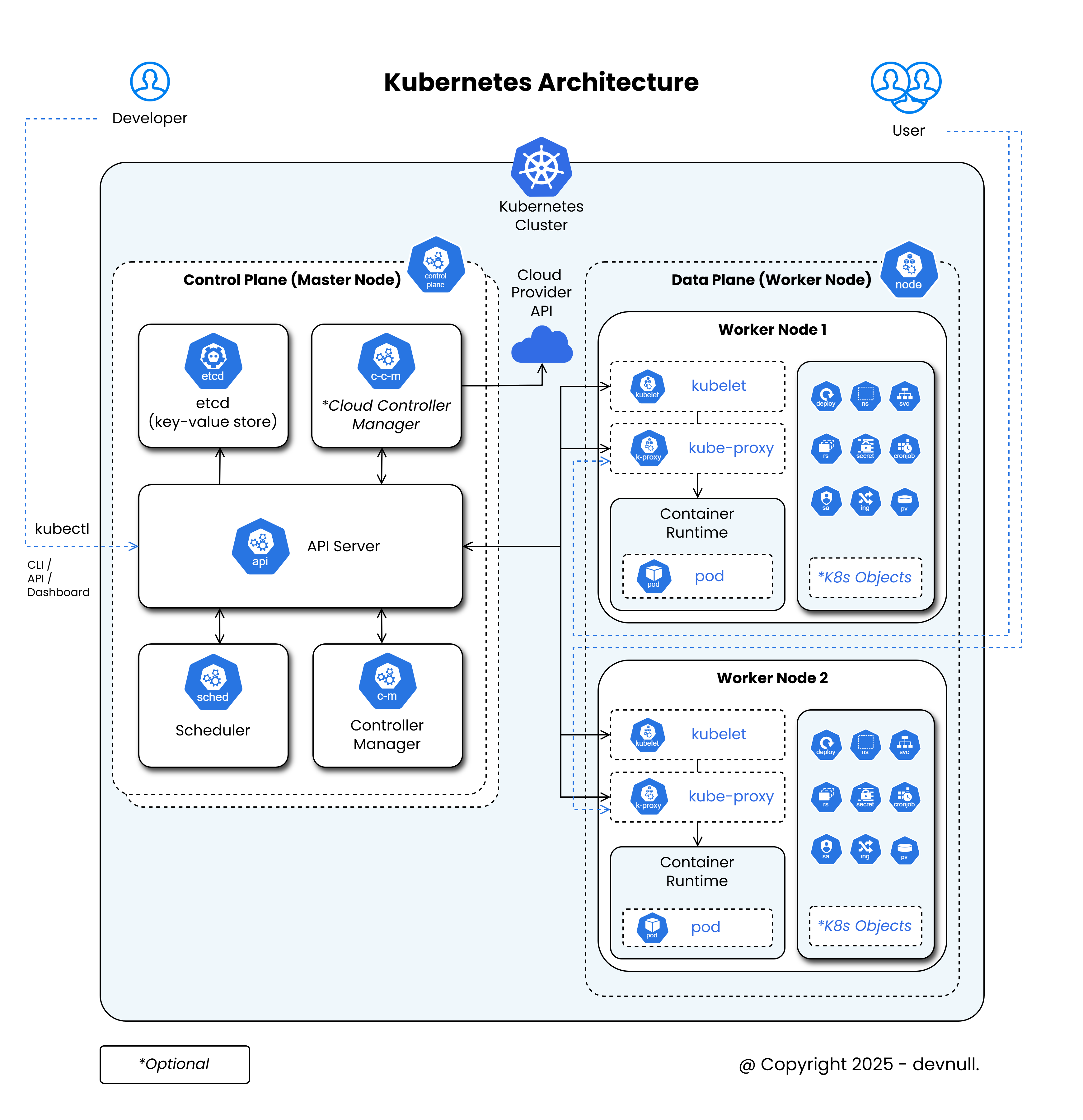 Kubernetes Architecture
Kubernetes works in a cluster, which consists of several nodes. In this architecture, there are two major roles:
- Control Plane (Master Node)
- Data Plane (Worker Node)
#Control Plane (Master Node)
This node is the control center of the Kubernetes cluster, so all interactions with the Kubernetes cluster go through this node. There are several components within the Master Node, including:
#API Server
This component serves as the main gateway or entry point for all commands sent to the Kubernetes cluster. Interactions with the Kubernetes cluster through the API Server can happen in various ways, including:
- kubectl (CLI)
- API
- Dashboard
This component provides REST API endpoints to manage communication between its components.
#etcd
This component is used as the data storage or database for the Kubernetes cluster configuration. The data storage used by etcd is a consistent and highly-available key-value store. All information such as status and configuration is stored here (for example, lists of Pods, Services, and so on).
#Scheduler
This component determines which node a pod (container) will run on. The scheduler makes this determination based on established rules such as Resource, Policy, Namespace, and so on.
#Controller Manager
This component is responsible for controlling the entire Kubernetes cluster, especially the Worker Nodes. For example, if we have more than one Worker Node, they can't run independently. Therefore, we need a component to manage them. The controller manager does exactly that. This component manages several controllers, including Node Controller, ReplicaSet Controller, and so on.
#Cloud Controller Manager (Optional)
Similar to the Controller Manager component, but this component is specifically for nodes deployed on Cloud Providers like AWS, GCP, and Azure that provide Cloud Provider APIs. This allows us to connect the Kubernetes cluster on-premise with those on Cloud Providers.
#Data Plane (Worker Node)
This node is where our applications run. Applications are in the form of pods (containers) that we deploy to the Kubernetes cluster. There are several components within the Worker Node, including:
#Kubelet
This component functions as an agent running on each node. Its task is to execute commands sent from the API Server component on the Master Node. So this component acts as a bridge between the Master Node and each Worker Node in the Kubernetes Cluster.
#Kube-proxy
This component manages networking rules on each node. Its tasks include load balancing, port forwarding, firewall management, and so on for pods.
#Container Runtime
This component is the engine used to run containers. Kubernetes supports many types of container runtimes, such as Docker / Containerd, CRI-O, and so on. Kubernetes manages containers through the Container Runtime Interface (CRI).
#Pod
This component is the smallest unit in Kubernetes. It can contain one or more containers that share an IP Address and Storage.
#K8s Objects (Optional)
There are other objects or components that are optional (not core concepts) in the Kubernetes cluster, such as Namespace, Deployment, Cronjob, Secret, Ingress, Service, and so on.
#Simple Kubernetes Workflow
After learning about Kubernetes concepts and architecture above, you're probably wondering how developers deploy to a Kubernetes cluster, right? With so many components involved, here's a simple workflow for deploying to a Kubernetes cluster:
- Developer creates a file in YAML format.
- Developer defines Kubernetes Objects used for deployment in the YAML file.
- Developer sends the YAML configuration file to the
API Server, for example throughkubectlwith a command like:

kubectl apply -f deployment.yamlAPI Serverrecords to theetcdcomponent and forwards the command to theSchedulercomponent.Schedulerdetermines the best Worker Node to run thePod.Kubeleton the selected Worker Node receives the command and runs thePodthrough theContainer Runtime.Kube-proxymanages networking so thePodcan be accessed from outside (usually through theServiceobject).
#Conclusion
Kubernetes is a fairly complex system, but if we break it down into smaller components, we can understand it more easily. Understanding this architecture is a very important foundation before moving on to advanced concepts like Service, Deployment, Ingress, ReplicaSet, and so on.
How was episode 2? Are you starting to feel overwhelmed understanding Kubernetes architecture 😅? It's okay to feel confused when first seeing and trying to understand the architecture of a Kubernetes cluster. But trust me, with time and lots of practice, this complexity will become something small or easy.
So that we can get hands-on practice creating a Kubernetes cluster, in the next episode 3, we'll discuss Kubernetes cluster installation, including both the Control Plane (Master Node) and Data Plane (Worker Node). Make sure the software or hardware tools explained in episode 0 are already prepared, so we can proceed directly with installing the Kubernetes cluster.