Learning Kubernetes - Introduction and Explanation of Affinity and Anti-Affinity
In this episode, we'll discuss Kubernetes Affinity and Anti-Affinity for intelligent Pod scheduling. We'll learn how Node Affinity, Pod Affinity, and Pod Anti-Affinity work, and best practices for workload placement.


#Introduction
In the previous episode, we explored Taints and Tolerations, which allow us to repel Pods from certain nodes. Now we'll dive into Affinity and Anti-Affinity, which give us fine-grained control over where Pods should be scheduled based on node characteristics and other Pod locations.
Note: Here I'll be using a Kubernetes Cluster installed through K3s.
While Taints and Tolerations work on a repulsion model (keeping Pods away), Affinity works on an attraction model (pulling Pods toward certain nodes or away from other Pods). This enables powerful workload placement strategies like co-locating related services or spreading Pods across availability zones.
#Understanding Affinity and Anti-Affinity
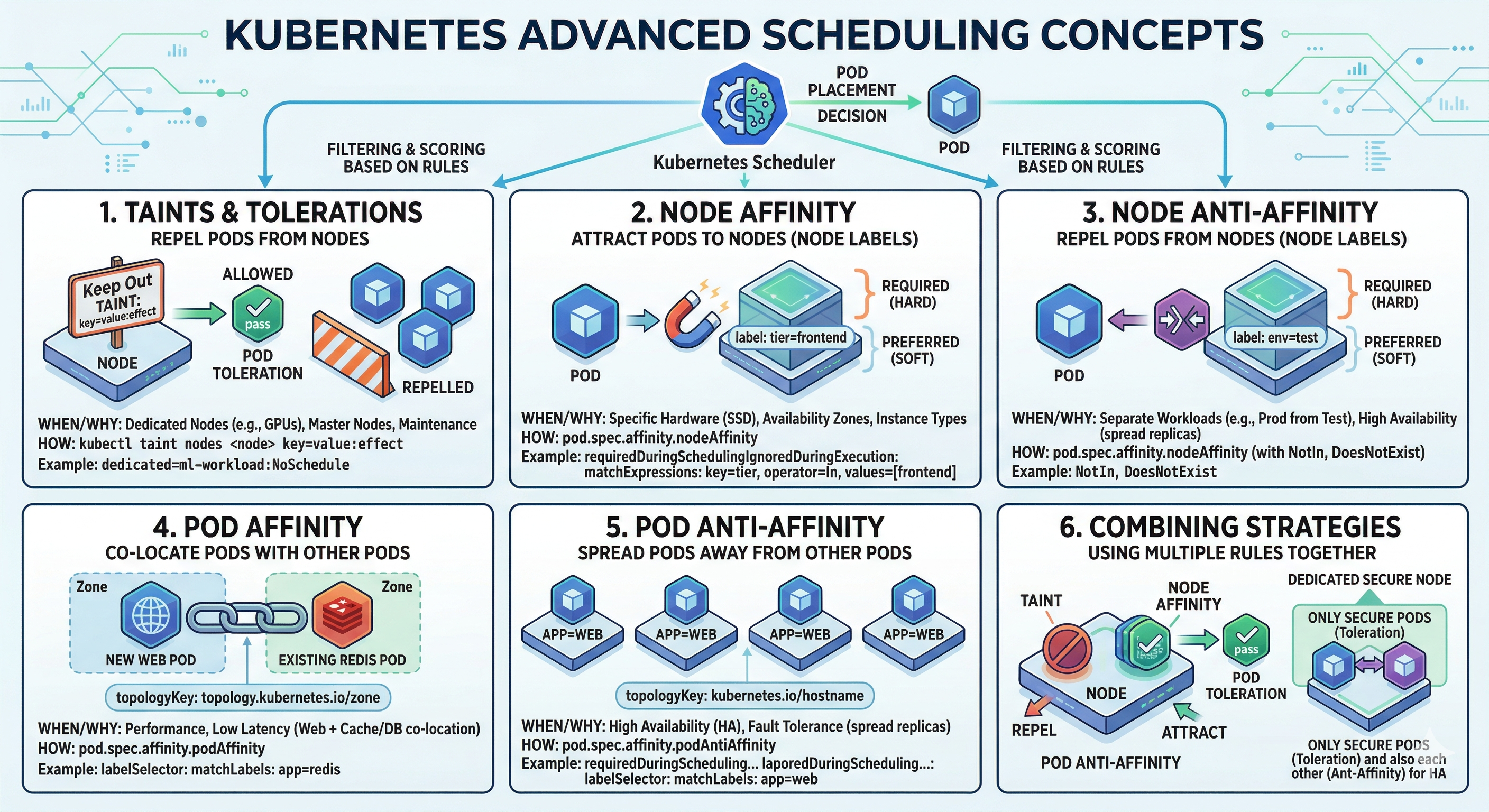 Advance Scheduling Concepts
Affinity and Anti-Affinity are scheduling rules that influence Pod placement decisions. Think of it like seating arrangements at a conference. Taints and Tolerations say "this table is reserved for VIPs only." Affinity and Anti-Affinity say "I want to sit near my team members" or "I want to sit away from the noisy crowd."
Kubernetes provides three types of affinity rules:
- Node Affinity - Schedule Pods on specific nodes based on node labels
- Pod Affinity - Schedule Pods near other Pods based on Pod labels
- Pod Anti-Affinity - Schedule Pods away from other Pods based on Pod labels
#Node Affinity
Node Affinity allows you to constrain which nodes your Pod can be scheduled on, based on node labels. It's more flexible than nodeSelector because it supports multiple matching expressions and soft preferences.
#Types of Node Affinity
requiredDuringSchedulingIgnoredDuringExecution (Hard Requirement)
This is a hard constraint. The Pod will only be scheduled if the node matches the affinity rules. If no matching node exists, the Pod remains unscheduled.

apiVersion: v1
kind: Pod
metadata:
  name: nginx-affinity
spec:
  affinity:
    nodeAffinity:
      requiredDuringSchedulingIgnoredDuringExecution:
        nodeSelectorTerms:
        - matchExpressions:
          - key: node-type
            operator: In
            values:
            - compute
            - gpu
  containers:
  - name: nginx
    image: nginx:latest
In this example, the Pod will only be scheduled on nodes with the label node-type=compute or node-type=gpu.
preferredDuringSchedulingIgnoredDuringExecution (Soft Preference)
This is a soft preference. The scheduler will try to place the Pod on matching nodes, but if no matching node exists, it will schedule the Pod on any available node. You can also assign weights to prefer certain nodes over others.
apiVersion: v1
kind: Pod
metadata:
  name: nginx-preferred
spec:
  affinity:
    nodeAffinity:
      preferredDuringSchedulingIgnoredDuringExecution:
      - weight: 100
        preference:
          matchExpressions:
          - key: disk-type
            operator: In
            values:
            - ssd
      - weight: 50
        preference:
          matchExpressions:
          - key: zone
            operator: In
            values:
            - us-east-1a
  containers:
  - name: nginx
    image: nginx:latest
The scheduler will prefer nodes with SSD disks (weight 100) over nodes in us-east-1a (weight 50). Higher weights have higher priority.
#Node Affinity Operators
Node Affinity supports several operators for matching:
- In - Label value is in the provided list
- NotIn - Label value is not in the provided list
- Exists - Label key exists (regardless of value)
- DoesNotExist - Label key does not exist
- Gt - Label value is greater than the provided value (string comparison)
- Lt - Label value is less than the provided value (string comparison)
apiVersion: v1
kind: Pod
metadata:
  name: nginx-operators
spec:
  affinity:
    nodeAffinity:
      requiredDuringSchedulingIgnoredDuringExecution:
        nodeSelectorTerms:
        - matchExpressions:
          - key: node-type
            operator: In
            values:
            - compute
          - key: gpu
            operator: Exists
          - key: cpu-cores
            operator: Gt
            values:
            - "4"
  containers:
  - name: nginx
    image: nginx:latest
This Pod requires nodes with node-type=compute, a gpu label (any value), and CPU cores greater than 4.
#Pod Affinity
Pod Affinity allows you to schedule Pods near other Pods. This is useful for co-locating related workloads to reduce latency or improve performance.
#Types of Pod Affinity
requiredDuringSchedulingIgnoredDuringExecution (Hard Requirement)
The Pod will only be scheduled on nodes that have other Pods matching the affinity rules.
apiVersion: v1
kind: Pod
metadata:
  name: app-pod
spec:
  affinity:
    podAffinity:
      requiredDuringSchedulingIgnoredDuringExecution:
      - labelSelector:
          matchExpressions:
          - key: app
            operator: In
            values:
            - database
        topologyKey: kubernetes.io/hostname
  containers:
  - name: app
    image: myapp:latest
This Pod will only be scheduled on nodes that already have Pods with the label app=database. The topologyKey defines the scope - kubernetes.io/hostname means the same node, while topology.kubernetes.io/zone means the same availability zone.
preferredDuringSchedulingIgnoredDuringExecution (Soft Preference)
The scheduler will try to place the Pod near matching Pods, but will schedule it elsewhere if necessary.
apiVersion: v1
kind: Pod
metadata:
  name: cache-pod
spec:
  affinity:
    podAffinity:
      preferredDuringSchedulingIgnoredDuringExecution:
      - weight: 100
        podAffinityTerm:
          labelSelector:
            matchExpressions:
            - key: app
              operator: In
              values:
              - web
          topologyKey: kubernetes.io/hostname
  containers:
  - name: cache
    image: redis:latest
This Pod prefers to be scheduled on the same node as Pods with app=web, but can be scheduled elsewhere if needed.
#Topology Key
The topologyKey is crucial for Pod affinity. It defines the scope of the affinity rule:
kubernetes.io/hostname- Same nodetopology.kubernetes.io/zone- Same availability zonetopology.kubernetes.io/region- Same region- Custom labels - Any custom topology label
#Pod Anti-Affinity
Pod Anti-Affinity ensures Pods are spread across nodes or zones. This is essential for high availability and fault tolerance.
#Hard Anti-Affinity
apiVersion: apps/v1
kind: Deployment
metadata:
  name: web-app
spec:
  replicas: 3
  selector:
    matchLabels:
      app: web
  template:
    metadata:
      labels:
        app: web
    spec:
      affinity:
        podAntiAffinity:
          requiredDuringSchedulingIgnoredDuringExecution:
          - labelSelector:
              matchLabels:
                app: web
            topologyKey: kubernetes.io/hostname
      containers:
      - name: web
        image: nginx:latest
This Deployment ensures that no two Pods with app=web are scheduled on the same node. If you have 3 replicas and only 2 nodes, one Pod will remain unscheduled.
#Soft Anti-Affinity
apiVersion: apps/v1
kind: Deployment
metadata:
  name: web-app-soft
spec:
  replicas: 5
  selector:
    matchLabels:
      app: web
  template:
    metadata:
      labels:
        app: web
    spec:
      affinity:
        podAntiAffinity:
          preferredDuringSchedulingIgnoredDuringExecution:
          - weight: 100
            podAffinityTerm:
              labelSelector:
                matchLabels:
                  app: web
              topologyKey: kubernetes.io/hostname
      containers:
      - name: web
        image: nginx:latest
This Deployment prefers to spread Pods across nodes, but will co-locate them if necessary. With 5 replicas and 3 nodes, some nodes will have multiple Pods.
#Combining Affinity Rules
You can combine multiple affinity rules in a single Pod specification. All rules must be satisfied for the Pod to be scheduled.
apiVersion: v1
kind: Pod
metadata:
  name: complex-affinity
spec:
  affinity:
    nodeAffinity:
      requiredDuringSchedulingIgnoredDuringExecution:
        nodeSelectorTerms:
        - matchExpressions:
          - key: node-type
            operator: In
            values:
            - compute
    podAffinity:
      preferredDuringSchedulingIgnoredDuringExecution:
      - weight: 100
        podAffinityTerm:
          labelSelector:
            matchLabels:
              app: database
          topologyKey: kubernetes.io/hostname
    podAntiAffinity:
      requiredDuringSchedulingIgnoredDuringExecution:
      - labelSelector:
          matchLabels:
            app: cache
        topologyKey: kubernetes.io/hostname
  containers:
  - name: app
    image: myapp:latest
This Pod will:
- Only be scheduled on nodes with
node-type=compute(required) - Prefer to be on the same node as
app=databasePods (soft) - Never be on the same node as
app=cachePods (required)
#Practical Examples
#High Availability Web Application
apiVersion: apps/v1
kind: Deployment
metadata:
  name: web-ha
spec:
  replicas: 3
  selector:
    matchLabels:
      app: web
  template:
    metadata:
      labels:
        app: web
    spec:
      affinity:
        podAntiAffinity:
          requiredDuringSchedulingIgnoredDuringExecution:
          - labelSelector:
              matchLabels:
                app: web
            topologyKey: topology.kubernetes.io/zone
      containers:
      - name: web
        image: nginx:latest
        resources:
          requests:
            cpu: 100m
            memory: 128Mi
This ensures each replica is in a different availability zone for maximum fault tolerance.
#Database with Local Cache
apiVersion: v1
kind: Pod
metadata:
  name: db-with-cache
spec:
  affinity:
    podAffinity:
      requiredDuringSchedulingIgnoredDuringExecution:
      - labelSelector:
          matchLabels:
            app: database
        topologyKey: kubernetes.io/hostname
  containers:
  - name: cache
    image: redis:latest
    resources:
      requests:
        cpu: 50m
        memory: 256Mi
This cache Pod will always run on the same node as the database Pod for low-latency access.
#GPU Workload with Node Affinity
apiVersion: v1
kind: Pod
metadata:
  name: ml-training
spec:
  affinity:
    nodeAffinity:
      requiredDuringSchedulingIgnoredDuringExecution:
        nodeSelectorTerms:
        - matchExpressions:
          - key: accelerator
            operator: In
            values:
            - nvidia-gpu
          - key: gpu-memory
            operator: Gt
            values:
            - "8Gi"
  containers:
  - name: training
    image: ml-training:latest
    resources:
      requests:
        nvidia.com/gpu: 1
This Pod will only be scheduled on nodes with NVIDIA GPUs and at least 8GB of GPU memory.
#Common Mistakes and Pitfalls
#Mistake 1: Using Hard Affinity When Soft is Better
Problem: Hard affinity rules can cause Pods to remain unscheduled if no matching nodes exist.
# DON'T DO THIS - Pod may never be scheduled
affinity:
  nodeAffinity:
    requiredDuringSchedulingIgnoredDuringExecution:
      nodeSelectorTerms:
      - matchExpressions:
        - key: ultra-rare-label
          operator: In
          values:
- valueSolution: Use soft preferences for flexibility.
#Mistake 2: Forgetting to Label Nodes
Problem: Affinity rules depend on node labels. If nodes aren't labeled, affinity rules won't work.
# Label nodes for affinity rules
kubectl label nodes node-1 node-type=compute
kubectl label nodes node-2 node-type=storage#Mistake 3: Incorrect Topology Key
Problem: Using the wrong topology key can cause unexpected scheduling behavior.
# DON'T DO THIS - topology key doesn't exist
affinity:
  podAntiAffinity:
    requiredDuringSchedulingIgnoredDuringExecution:
    - labelSelector:
        matchLabels:
          app: web
topologyKey: non-existent-label#Mistake 4: Mixing Affinity with Taints/Tolerations Incorrectly
Problem: Affinity and Taints/Tolerations work together but serve different purposes.
# Node has taint: gpu=true:NoSchedule
# Pod has toleration and affinity
apiVersion: v1
kind: Pod
metadata:
  name: gpu-pod
spec:
  tolerations:
  - key: gpu
    operator: Equal
    value: "true"
    effect: NoSchedule
  affinity:
    nodeAffinity:
      requiredDuringSchedulingIgnoredDuringExecution:
        nodeSelectorTerms:
        - matchExpressions:
          - key: accelerator
            operator: In
            values:
            - nvidia-gpu
  containers:
  - name: app
image: myapp:latest#Mistake 5: Over-constraining with Multiple Affinity Rules
Problem: Too many affinity rules can make Pods unschedulable.
Solution: Balance constraints with flexibility.
#Best Practices
#Use Soft Preferences for Flexibility
Prefer preferredDuringSchedulingIgnoredDuringExecution over hard requirements unless absolutely necessary. This ensures Pods can still be scheduled even if preferences can't be met.
#Combine with Pod Disruption Budgets
Use PodDisruptionBudgets with anti-affinity to ensure high availability during maintenance.
apiVersion: policy/v1
kind: PodDisruptionBudget
metadata:
  name: web-pdb
spec:
  minAvailable: 2
  selector:
    matchLabels:
app: web#Use Zone-based Anti-Affinity for HA
For production workloads, use topology.kubernetes.io/zone as the topology key to spread Pods across availability zones.
affinity:
  podAntiAffinity:
    requiredDuringSchedulingIgnoredDuringExecution:
    - labelSelector:
        matchLabels:
          app: web
topologyKey: topology.kubernetes.io/zone#Label Nodes Consistently
Establish a labeling convention for your cluster. Common labels include:
node-type(compute, storage, gpu)zone(us-east-1a, us-east-1b)disk-type(ssd, hdd)workload-type(general, ml, database)
#Monitor Affinity Violations
Check if Pods are being scheduled according to affinity rules. Use kubectl describe pod to see affinity information and scheduling decisions.
kubectl describe pod <pod-name>
# Look for "Events" section to see scheduling decisions#Test Affinity Rules
Before deploying to production, test affinity rules in a staging environment to ensure they work as expected.
# Create a test Pod with affinity rules
kubectl apply -f test-affinity.yaml

# Check if Pod is scheduled
kubectl get pods -o wide

# Describe Pod to see affinity details
kubectl describe pod <pod-name>#Affinity vs Taints/Tolerations
While both control Pod placement, they work differently:
| Aspect | Affinity | Taints/Tolerations |
|---|---|---|
| Model | Attraction (pull) | Repulsion (push) |
| Scope | Pod-centric | Node-centric |
| Use Case | Co-locate workloads | Reserve nodes |
| Flexibility | More flexible | More restrictive |
| Performance | Soft preferences available | Only hard constraints |
Use Taints/Tolerations for node reservation and Affinity for intelligent workload placement.
#Conclusion
In episode 35, we've explored Affinity and Anti-Affinity in Kubernetes in depth. We've learned how Node Affinity lets you target specific nodes, Pod Affinity co-locates related workloads, and Pod Anti-Affinity spreads Pods for high availability.
Key takeaways:
- Node Affinity - Target specific nodes based on labels
- Pod Affinity - Co-locate Pods near each other
- Pod Anti-Affinity - Spread Pods across nodes or zones
- Hard requirements - Pod won't schedule if not met
- Soft preferences - Pod schedules elsewhere if needed
- Topology keys - Define scope (node, zone, region)
- Operators - In, NotIn, Exists, DoesNotExist, Gt, Lt
- Combine with Taints/Tolerations - For precise placement
- Label nodes consistently - Essential for affinity rules
- Test thoroughly - Before production deployment
- Monitor scheduling - Verify affinity rules work as expected
By combining these with proper node labeling and topology keys, you can build resilient, performant Kubernetes clusters.