Learning Kubernetes - Introduction and Explanation of GitOps
In this episode, we'll discuss GitOps for managing Kubernetes deployments using Git as the source of truth. We'll learn GitOps principles, tools like ArgoCD and Flux, and best practices for implementing GitOps workflows.


#Introduction
In the previous episode, we explored Kustomize, which provides a declarative approach to customizing Kubernetes manifests. Now we'll dive into GitOps, which uses Git as the source of truth for Kubernetes deployments.
Note: Here I'll be using a Kubernetes Cluster installed through K3s.
GitOps is a set of practices that uses Git repositories as the single source of truth for declarative infrastructure and applications. Instead of manually applying kubectl commands, you commit your desired state to Git, and automated tools synchronize your cluster to match that state. Think of GitOps like Infrastructure as Code for Kubernetes - your entire cluster configuration lives in Git.
#Understanding GitOps
GitOps is based on four core principles:
1. Declarative
Your entire system is described declaratively in Git.
2. Versioned and Immutable
All changes are tracked in Git with full history.
3. Pulled Automatically
Automated tools pull changes from Git and apply them to the cluster.
4. Continuously Reconciled
The cluster state is continuously compared with Git and reconciled.
#Why GitOps Matters
1. Single Source of Truth
Git is the authoritative source for all cluster state.
2. Audit Trail
Every change is tracked with commit history.
3. Easy Rollback
Revert to any previous state by reverting Git commits.
4. Collaboration
Teams collaborate through pull requests and code review.
5. Automation
Continuous deployment without manual intervention.
6. Disaster Recovery
Recreate entire cluster from Git.
#GitOps Workflow
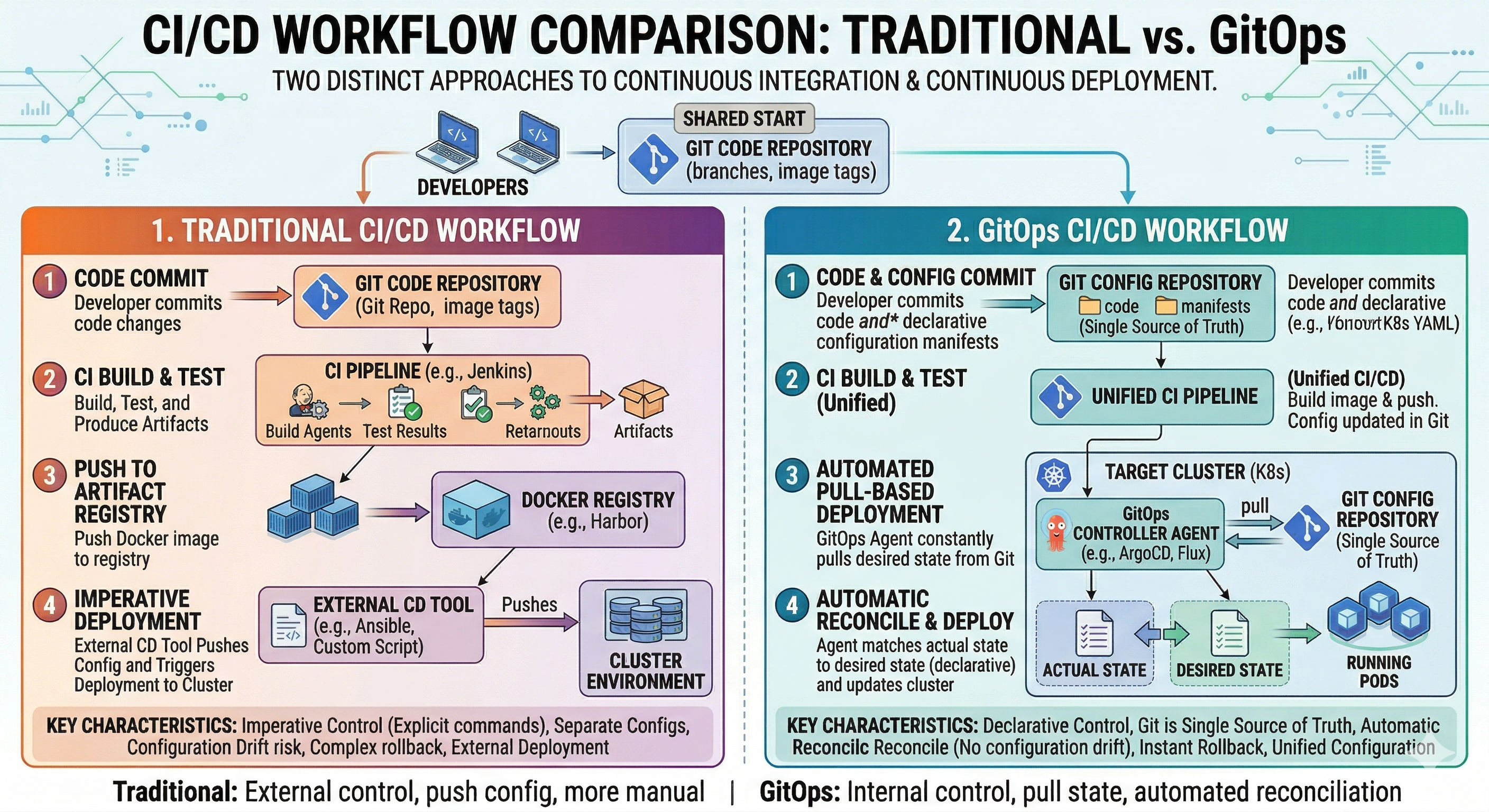 Traditional vs GitOps
#Traditional Deployment
Developer → kubectl apply → ClusterManual, error-prone, no audit trail.
#GitOps Deployment
Developer → Git Commit → GitOps Tool → ClusterAutomated, auditable, reproducible.
#GitOps Flow
- Developer commits changes to Git
- CI/CD pipeline validates changes
- GitOps tool detects changes
- GitOps tool applies changes to cluster
- Cluster state matches Git state
#GitOps Tools
#ArgoCD
ArgoCD is a declarative, GitOps continuous delivery tool for Kubernetes.
Installation

kubectl create namespace argocd
kubectl apply -n argocd -f https://raw.githubusercontent.com/argoproj/argo-cd/stable/manifests/install.yaml
Access ArgoCD UI
kubectl port-forward svc/argocd-server -n argocd 8080:443Get Initial Password
kubectl -n argocd get secret argocd-initial-admin-secret -o jsonpath="{.data.password}" | base64 -d#Flux
Flux is a tool for keeping Kubernetes clusters in sync with sources of configuration.
Installation
curl -s https://fluxcd.io/install.sh | sudo bash
flux install
Bootstrap from Git
flux bootstrap github \
  --owner=your-username \
  --repository=fleet-infra \
  --branch=main \
  --path=./clusters/my-cluster \
--personal#GitOps Repository Structure
#Typical Structure
gitops-repo/
├── clusters/
│   ├── dev/
│   │   ├── kustomization.yaml
│   │   └── apps/
│   ├── staging/
│   │   ├── kustomization.yaml
│   │   └── apps/
│   └── production/
│       ├── kustomization.yaml
│       └── apps/
├── apps/
│   ├── web-app/
│   │   ├── base/
│   │   └── overlays/
│   └── api-app/
│       ├── base/
│       └── overlays/
└── infrastructure/
    ├── networking/
    ├── storage/
└── monitoring/#Example Repository
apiVersion: kustomize.config.k8s.io/v1beta1
kind: Kustomization

resources:
  - ../../apps/web-app/overlays/production
  - ../../apps/api-app/overlays/production
- ../../infrastructure/monitoringapiVersion: kustomize.config.k8s.io/v1beta1
kind: Kustomization
bases:
- ../../base
namespace: production
replicas:
- name: web-app
count: 3
images:
- name: web-app
newTag: "v1.0.0"
commonLabels:
environment: production#ArgoCD Application
#Basic Application
apiVersion: argoproj.io/v1alpha1
kind: Application
metadata:
  name: web-app
  namespace: argocd
spec:
  project: default
  source:
    repoURL: https://github.com/your-org/gitops-repo
    targetRevision: main
    path: apps/web-app/overlays/production
  destination:
    server: https://kubernetes.default.svc
    namespace: production
  syncPolicy:
    automated:
      prune: true
      selfHeal: true
    syncOptions:
- CreateNamespace=true#Application with Multiple Sources
apiVersion: argoproj.io/v1alpha1
kind: Application
metadata:
  name: full-stack
  namespace: argocd
spec:
  project: default
  sources:
  - repoURL: https://github.com/your-org/gitops-repo
    targetRevision: main
    path: apps/web-app/overlays/production
  - repoURL: https://github.com/your-org/gitops-repo
    targetRevision: main
    path: apps/api-app/overlays/production
  destination:
    server: https://kubernetes.default.svc
    namespace: production
  syncPolicy:
    automated:
      prune: true
selfHeal: true#Flux Kustomization
#Basic Kustomization
apiVersion: kustomize.toolkit.fluxcd.io/v1
kind: Kustomization
metadata:
  name: web-app
  namespace: flux-system
spec:
  interval: 10m
  sourceRef:
    kind: GitRepository
    name: gitops-repo
  path: ./apps/web-app/overlays/production
  prune: true
wait: true#Git Repository Source
apiVersion: source.toolkit.fluxcd.io/v1
kind: GitRepository
metadata:
  name: gitops-repo
  namespace: flux-system
spec:
  interval: 1m
  url: https://github.com/your-org/gitops-repo
  ref:
    branch: main
  secretRef:
name: git-credentials#GitOps Workflow Example
#1. Developer Makes Changes
# Edit deployment
vim apps/web-app/overlays/production/kustomization.yaml

# Commit changes
git add apps/web-app/overlays/production/kustomization.yaml
git commit -m "Increase web-app replicas to 5"
git push origin main#2. GitOps Tool Detects Changes
ArgoCD or Flux automatically detects the Git commit.
#3. GitOps Tool Applies Changes
# ArgoCD syncs automatically
argocd app sync web-app

# Or Flux reconciles automatically
flux reconcile kustomization web-app#4. Cluster State Updated
The cluster is updated to match the Git state.
#Pull Request Workflow
#1. Create Feature Branch
git checkout -b feature/increase-replicas#2. Make Changes
# Update configuration
vim apps/web-app/overlays/production/kustomization.yaml#3. Create Pull Request
git push origin feature/increase-replicas
# Create PR on GitHub#4. Review and Approve
Team reviews changes in PR.
#5. Merge to Main
# After approval, merge PR
git merge feature/increase-replicas
git push origin main#6. GitOps Tool Syncs
GitOps tool automatically applies changes to cluster.
#Practical Examples
#Multi-Environment Setup
apiVersion: kustomize.config.k8s.io/v1beta1
kind: Kustomization

resources:
  - ../../apps/web-app/overlays/dev
  - ../../apps/api-app/overlays/dev

namespace: devapiVersion: kustomize.config.k8s.io/v1beta1
kind: Kustomization
resources:
- ../../apps/web-app/overlays/production
- ../../apps/api-app/overlays/production
namespace: production#ArgoCD Application per Environment
apiVersion: argoproj.io/v1alpha1
kind: Application
metadata:
  name: dev-cluster
  namespace: argocd
spec:
  project: default
  source:
    repoURL: https://github.com/your-org/gitops-repo
    targetRevision: main
    path: clusters/dev
  destination:
    server: https://kubernetes.default.svc
  syncPolicy:
    automated:
      prune: true
selfHeal: trueapiVersion: argoproj.io/v1alpha1
kind: Application
metadata:
name: prod-cluster
namespace: argocd
spec:
project: default
source:
repoURL: https://github.com/your-org/gitops-repo
targetRevision: main
path: clusters/production
destination:
server: https://kubernetes.default.svc
syncPolicy:
automated:
prune: true
selfHeal: true#Common Mistakes and Pitfalls
#Mistake 1: Mixing Manual and GitOps
Problem: Some changes applied manually, others through GitOps.
# DON'T DO THIS - Manual changes bypass GitOps
kubectl apply -f deployment.yaml
kubectl set image deployment/web-app web-app=myapp:2.0Solution: All changes through Git:
# Update Git
vim apps/web-app/overlays/production/kustomization.yaml
git commit -m "Update image to 2.0"
git push#Mistake 2: Not Protecting Main Branch
Problem: Anyone can push directly to main.
Solution: Require pull requests and reviews:
# Require pull request reviews
# Require status checks to pass
# Require branches to be up to date#Mistake 3: Storing Secrets in Git
Problem: Sensitive data exposed in Git.
# DON'T DO THIS - Secrets in Git
apiVersion: v1
kind: Secret
metadata:
  name: db-secret
data:
password: c2VjcmV0MTIz # base64 encodedSolution: Use secret management tools:
# Use ArgoCD Sealed Secrets or External Secrets Operator
# Store secrets in external vault#Mistake 4: Not Testing Changes
Problem: Broken configurations deployed to production.
Solution: Test before merging:
# Validate YAML
kustomize build apps/web-app/overlays/production

# Run tests
kubectl apply -k apps/web-app/overlays/production --dry-run=client#Mistake 5: Ignoring Sync Status
Problem: Cluster drifts from Git state.
Solution: Monitor sync status:
# Check ArgoCD sync status
argocd app get web-app

# Check Flux reconciliation
flux get kustomization web-app#Best Practices
#1. Use Pull Requests for All Changes
# Never push directly to main
git checkout -b feature/my-change
# Make changes
git push origin feature/my-change
# Create PR, get review, merge#2. Protect Main Branch
- Require pull request reviews
- Require status checks to pass
- Require branches to be up to date
#3. Use Separate Repositories
gitops-repo/
├── clusters/
├── apps/
└── infrastructure/#4. Implement Proper RBAC
apiVersion: v1
kind: ConfigMap
metadata:
  name: argocd-rbac-cm
  namespace: argocd
data:
  policy.default: role:readonly
  policy.csv: |
    p, role:admin, applications, *, */*, allow
    p, role:dev, applications, get, dev/*, allow
g, developers, role:dev#5. Monitor and Alert
# Monitor sync status
argocd app list

# Check for drift
argocd app diff web-app

# Set up alerts for sync failures#6. Use GitOps for Infrastructure Too
gitops-repo/
├── infrastructure/
│   ├── networking/
│   ├── storage/
│   └── monitoring/
├── apps/
└── clusters/#7. Document Everything
# GitOps Repository

## Structure

- `clusters/` - Cluster configurations
- `apps/` - Application configurations
- `infrastructure/` - Infrastructure configurations

## Workflow

1. Create feature branch
2. Make changes
3. Create pull request
4. Get review
5. Merge to main
6. GitOps tool syncs automatically#GitOps vs Traditional Deployment
| Aspect | GitOps | Traditional |
|---|---|---|
| Source of Truth | Git | Manual commands |
| Audit Trail | Full Git history | Limited logs |
| Rollback | Git revert | Manual |
| Collaboration | Pull requests | Ad-hoc |
| Automation | Continuous | Manual |
| Disaster Recovery | Git clone | Manual restore |
| Compliance | Auditable | Difficult |
#Monitoring GitOps
#ArgoCD Monitoring
# Check application status
argocd app list
argocd app get web-app

# Check sync status
argocd app sync web-app

# View application details
argocd app info web-app#Flux Monitoring
# Check reconciliation status
flux get kustomization
flux get helmrelease

# Check source status
flux get source git

# View reconciliation logs
flux logs --all-namespaces --follow#Conclusion
In episode 40, we've explored GitOps in Kubernetes in depth. We've learned GitOps principles, tools like ArgoCD and Flux, and best practices for implementing GitOps workflows.
Key takeaways:
- GitOps uses Git as source of truth for cluster state
- Declarative - Entire system described in Git
- Versioned - All changes tracked with history
- Pulled Automatically - Tools sync cluster to Git state
- Continuously Reconciled - Cluster state always matches Git
- ArgoCD - Declarative continuous delivery tool
- Flux - Tool for keeping clusters in sync
- Pull Request Workflow - Changes reviewed before deployment
- Multi-Environment - Manage dev, staging, production from Git
- Audit Trail - Full history of all changes
- Easy Rollback - Revert to any previous state
- Disaster Recovery - Recreate cluster from Git
- Collaboration - Teams work through pull requests
- Automation - Continuous deployment without manual intervention
- Single Source of Truth - Git is authoritative
GitOps transforms how you manage Kubernetes deployments by making Git the single source of truth and automating synchronization.