Learning Kubernetes - Introduction and Explanation of Service Mesh
In this episode, we'll discuss Service Mesh for managing service-to-service communication in Kubernetes. We'll learn about Istio, Linkerd, traffic management, security, and observability features of service meshes.


#Introduction
In the previous episode, we explored Observability, which enables you to understand what's happening inside your Kubernetes cluster. Now we'll dive into Service Mesh, which manages service-to-service communication.
Note: Here I'll be using a Kubernetes Cluster installed through K3s.
As microservices grow, managing communication between services becomes complex. Service Mesh is a dedicated infrastructure layer that handles service-to-service communication. Think of it like a traffic controller for your microservices - it manages routing, security, and observability without requiring changes to application code.
#Understanding Service Mesh
Service Mesh is a configurable infrastructure layer that handles inter-service communication in a microservices architecture.
#Service Mesh vs Gateway API
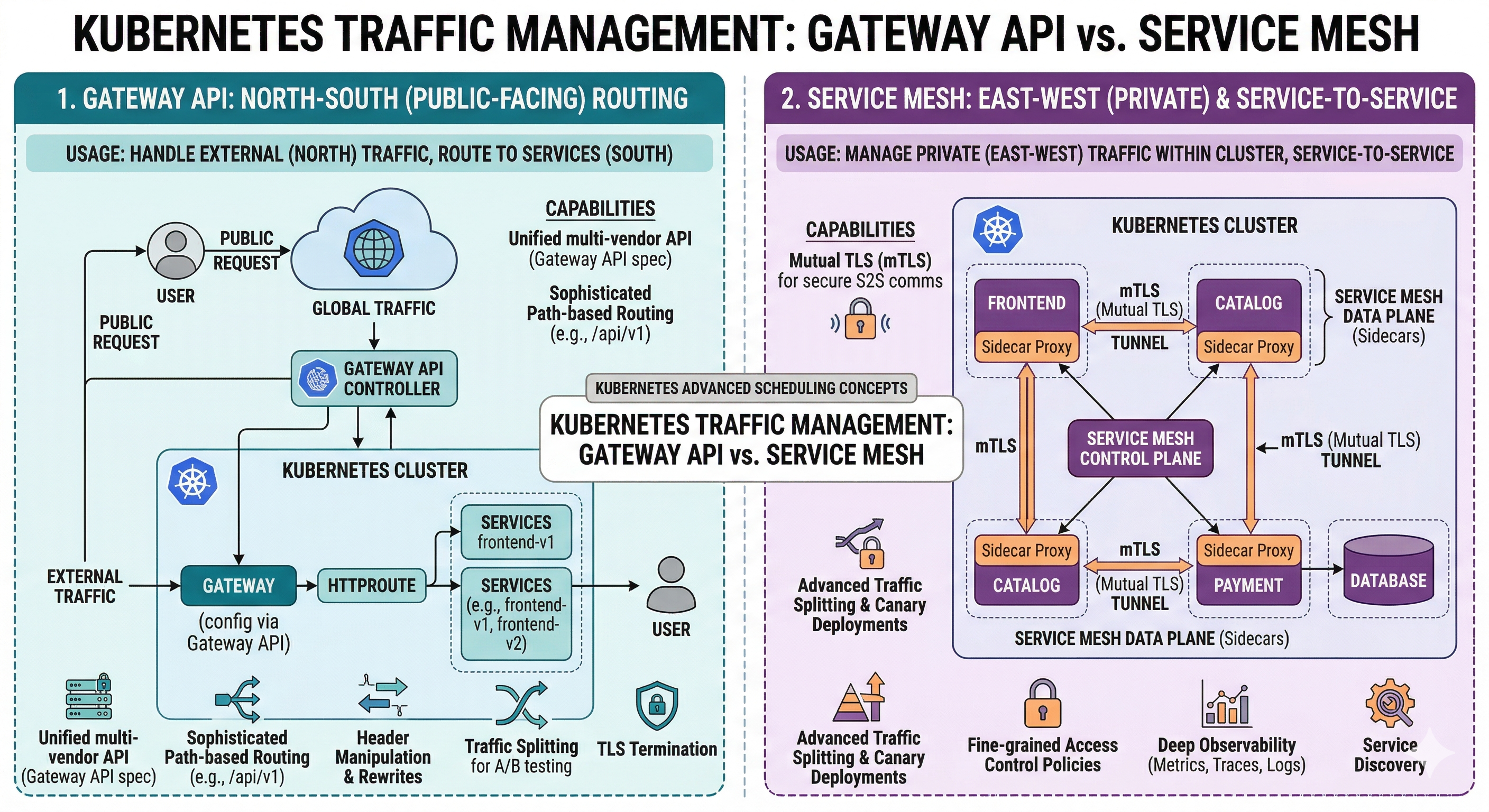 Service Mesh (East-West Routing or Service-to-Service) vs Gateway API (North-South Routing or Public Facing)
#Service Mesh Observability
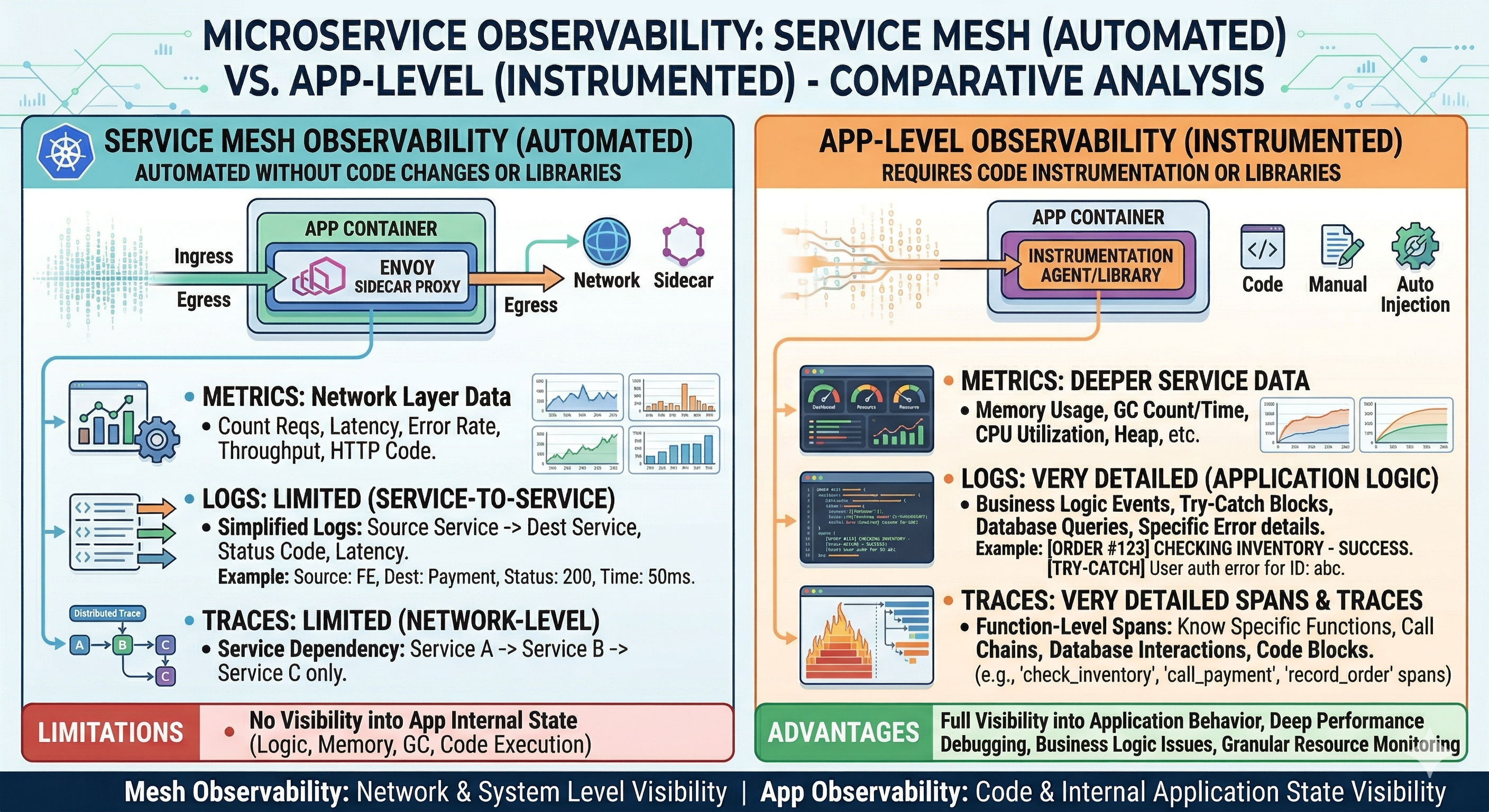 Service Mesh Observability
#Kubernetes Deployment Strategies
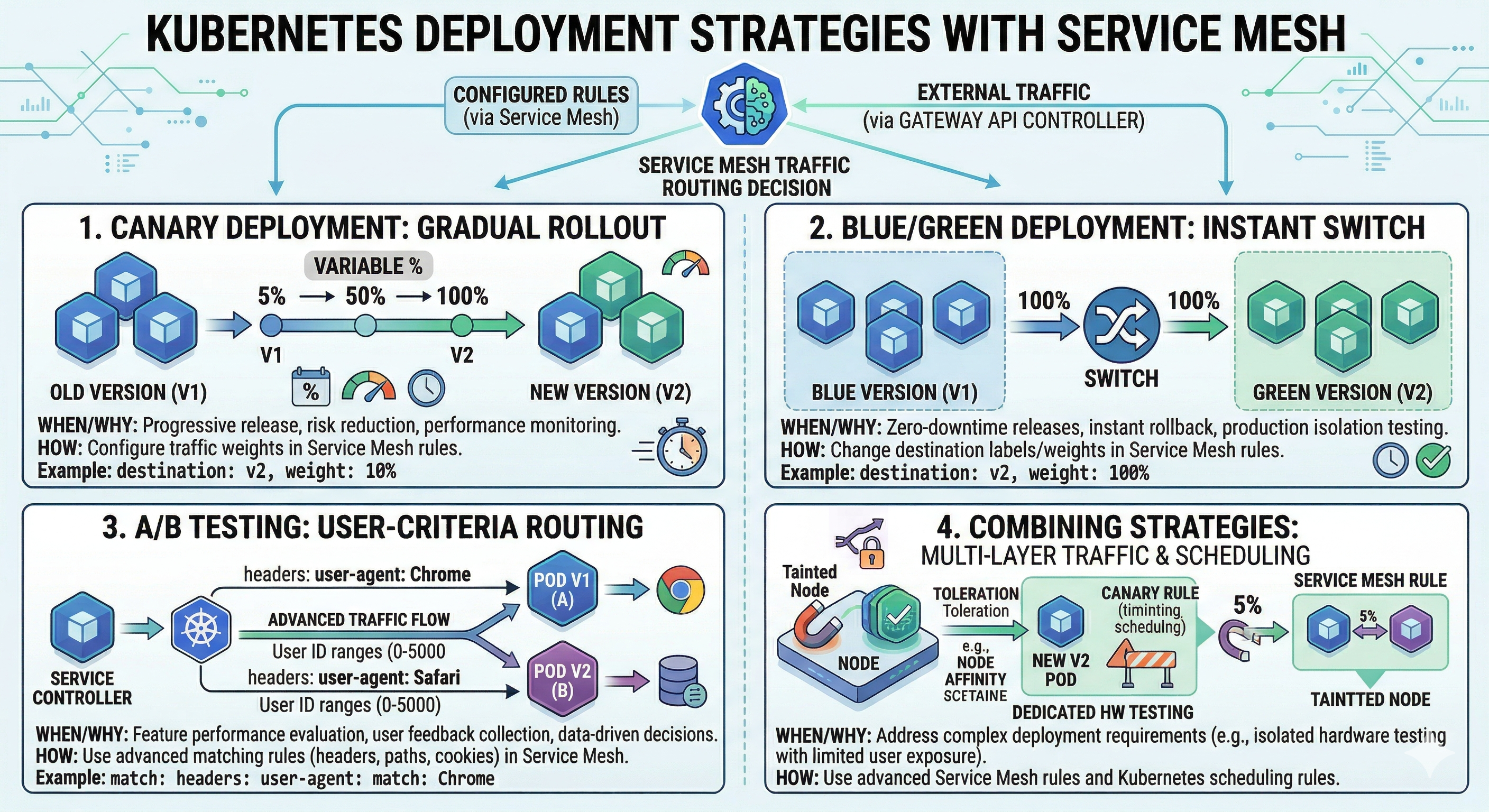 Kubernetes Deployment Strategies
#Why Service Mesh Matters
1. Traffic Management
Control how traffic flows between services.
2. Security
Enforce mutual TLS and authorization policies.
3. Observability
Automatic metrics, logs, and traces for service communication.
4. Resilience
Circuit breaking, retries, and timeouts.
5. Load Balancing
Intelligent load balancing across service instances.
6. Canary Deployments
Gradually roll out new versions.
7. Compliance
Meet security and compliance requirements.
#Service Mesh Architecture
#Components
┌─────────────────────────────────────┐
│      Control Plane                  │
│  - Policy management                │
│  - Configuration                    │
│  - Certificate management           │
└──────────────┬──────────────────────┘
               │
┌──────────────▼──────────────────────┐
│      Data Plane                     │
│  - Sidecar proxies                  │
│  - Service-to-service routing       │
│  - Traffic management               │
└─────────────────────────────────────┘#Control Plane vs Data Plane
Control Plane
Manages configuration and policies.
Data Plane
Executes traffic management and security policies.
#Istio
Istio is the most popular service mesh for Kubernetes.
#Installation

# Download Istio
curl -L https://istio.io/downloadIstio | sh -
cd istio-1.19.0

# Install Istio
./bin/istioctl install --set profile=demo -y

# Enable sidecar injection
kubectl label namespace default istio-injection=enabled#Istio Components
Istiod
Control plane component managing configuration.
Envoy Proxy
Sidecar proxy handling traffic.
Ingress Gateway
Entry point for external traffic.
Egress Gateway
Exit point for external traffic.
#Sidecar Injection
apiVersion: v1
kind: Namespace
metadata:
  name: production
  labels:
    istio-injection: enabled
---
apiVersion: v1
kind: Pod
metadata:
  name: app-pod
  namespace: production
spec:
  containers:
  - name: app
image: myapp:latest#Virtual Service and Destination Rule
#VirtualService
Routes traffic to services:
apiVersion: networking.istio.io/v1beta1
kind: VirtualService
metadata:
  name: web-app
spec:
  hosts:
  - web-app
  http:
  - match:
    - uri:
      prefix: "/api"
    route:
    - destination:
        host: web-app
        port:
          number: 8080
        subset: v1
      weight: 90
    - destination:
        host: web-app
        port:
          number: 8080
        subset: v2
weight: 10#DestinationRule
Defines load balancing and connection pooling:
apiVersion: networking.istio.io/v1beta1
kind: DestinationRule
metadata:
  name: web-app
spec:
  host: web-app
  trafficPolicy:
    connectionPool:
      tcp:
        maxConnections: 100
      http:
        http1MaxPendingRequests: 100
        maxRequestsPerConnection: 2
    loadBalancer:
      simple: ROUND_ROBIN
    outlierDetection:
      consecutive5xxErrors: 5
      interval: 30s
      baseEjectionTime: 30s
  subsets:
  - name: v1
    labels:
      version: v1
  - name: v2
    labels:
version: v2#Traffic Management
#Canary Deployment
Gradually shift traffic to new version:
apiVersion: networking.istio.io/v1beta1
kind: VirtualService
metadata:
  name: web-app
spec:
  hosts:
  - web-app
  http:
  - match:
    - headers:
        user-agent:
          regex: ".*Chrome.*"
    route:
    - destination:
        host: web-app
        subset: v2
  - route:
    - destination:
        host: web-app
        subset: v1
      weight: 95
    - destination:
        host: web-app
        subset: v2
weight: 5#Retry Policy
apiVersion: networking.istio.io/v1beta1
kind: VirtualService
metadata:
  name: web-app
spec:
  hosts:
  - web-app
  http:
  - route:
    - destination:
        host: web-app
    retries:
      attempts: 3
perTryTimeout: 2s#Timeout
apiVersion: networking.istio.io/v1beta1
kind: VirtualService
metadata:
  name: web-app
spec:
  hosts:
  - web-app
  http:
  - route:
    - destination:
        host: web-app
timeout: 10s#Security
#PeerAuthentication
Enforce mutual TLS:
apiVersion: security.istio.io/v1beta1
kind: PeerAuthentication
metadata:
  name: default
spec:
  mtls:
mode: STRICT#AuthorizationPolicy
Control access between services:
apiVersion: security.istio.io/v1beta1
kind: AuthorizationPolicy
metadata:
  name: web-app-policy
spec:
  selector:
    matchLabels:
      app: web-app
  rules:
  - from:
    - source:
        principals: ["cluster.local/ns/default/sa/api-service"]
    to:
    - operation:
        methods: ["GET"]
        paths: ["/api/v1/*"]
  - from:
    - source:
        principals: ["cluster.local/ns/default/sa/admin-service"]
    to:
    - operation:
methods: ["*"]#Linkerd
Linkerd is a lightweight service mesh alternative to Istio.
#Installation
# Install Linkerd CLI
curl https://run.linkerd.io/install | sh

# Install Linkerd
linkerd install | kubectl apply -f -

# Verify installation
linkerd check

# Enable automatic sidecar injection
kubectl annotate namespace default linkerd.io/inject=enabled#Linkerd vs Istio
| Aspect | Linkerd | Istio |
|---|---|---|
| Complexity | Simple | Complex |
| Resource Usage | Low | High |
| Features | Core features | Comprehensive |
| Learning Curve | Easy | Steep |
| Performance | Fast | Slower |
| Community | Growing | Large |
#Practical Examples
#Blue-Green Deployment
apiVersion: apps/v1
kind: Deployment
metadata:
  name: web-app-blue
spec:
  replicas: 3
  selector:
    matchLabels:
      app: web-app
      version: blue
  template:
    metadata:
      labels:
        app: web-app
        version: blue
    spec:
      containers:
      - name: web-app
        image: myapp:1.0
---
apiVersion: apps/v1
kind: Deployment
metadata:
  name: web-app-green
spec:
  replicas: 3
  selector:
    matchLabels:
      app: web-app
      version: green
  template:
    metadata:
      labels:
        app: web-app
        version: green
    spec:
      containers:
      - name: web-app
        image: myapp:2.0
---
apiVersion: networking.istio.io/v1beta1
kind: VirtualService
metadata:
  name: web-app
spec:
  hosts:
  - web-app
  http:
  - route:
    - destination:
        host: web-app
        subset: blue
      weight: 100
    - destination:
        host: web-app
        subset: green
weight: 0#Circuit Breaker
apiVersion: networking.istio.io/v1beta1
kind: DestinationRule
metadata:
  name: web-app
spec:
  host: web-app
  trafficPolicy:
    outlierDetection:
      consecutive5xxErrors: 5
      interval: 30s
      baseEjectionTime: 30s
      maxEjectionPercent: 50
minRequestVolume: 5#Request Routing
apiVersion: networking.istio.io/v1beta1
kind: VirtualService
metadata:
  name: web-app
spec:
  hosts:
  - web-app
  http:
  - match:
    - uri:
        prefix: "/admin"
    route:
    - destination:
        host: web-app
        subset: admin
  - match:
    - uri:
        prefix: "/api"
    route:
    - destination:
        host: web-app
        subset: api
  - route:
    - destination:
        host: web-app
subset: web#Common Mistakes and Pitfalls
#Mistake 1: Over-Engineering
Problem: Using service mesh for simple deployments.
Solution: Start simple, add service mesh when needed:
# Start with basic Kubernetes
# Add service mesh when managing multiple services#Mistake 2: Not Understanding Sidecar Overhead
Problem: Unexpected performance degradation.
Solution: Monitor sidecar resource usage:
kubectl top pods -n default
kubectl describe pod pod-name#Mistake 3: Misconfiguring mTLS
Problem: Services can't communicate due to TLS issues.
Solution: Verify mTLS configuration:
istioctl analyze
kubectl get peerauthentication -A#Mistake 4: Not Monitoring Service Mesh
Problem: Can't troubleshoot service mesh issues.
Solution: Enable observability:
# Install Kiali for visualization
kubectl apply -f https://raw.githubusercontent.com/istio/istio/release-1.19/samples/addons/kiali.yaml#Mistake 5: Ignoring Network Policies
Problem: Service mesh doesn't replace network policies.
Solution: Use both service mesh and network policies:
apiVersion: networking.k8s.io/v1
kind: NetworkPolicy
metadata:
  name: web-app-policy
spec:
  podSelector:
    matchLabels:
      app: web-app
  policyTypes:
  - Ingress
  - Egress
  ingress:
  - from:
    - podSelector:
        matchLabels:
app: api-service#Best Practices
#1. Start with Observability
# Install observability addons
kubectl apply -f https://raw.githubusercontent.com/istio/istio/release-1.19/samples/addons/prometheus.yaml
kubectl apply -f https://raw.githubusercontent.com/istio/istio/release-1.19/samples/addons/grafana.yaml#2. Implement Gradual Rollout
# Use canary deployments
weight: 90  # 90% to v1
weight: 10 # 10% to v2#3. Use Namespace Isolation
# Separate namespaces for different environments
namespaces:
  - production
  - staging
- development#4. Monitor Resource Usage
# Check sidecar resource consumption
kubectl top pods -n default#5. Implement Circuit Breaking
outlierDetection:
  consecutive5xxErrors: 5
interval: 30s#6. Use Mutual TLS
mtls:
mode: STRICT#7. Document Policies
# Service Mesh Policies

## mTLS
- Enabled: STRICT mode
- Certificate rotation: Automatic

## Traffic Management
- Canary: 10% to new version
- Timeout: 10s#8. Test Failure Scenarios
# Simulate service failure
kubectl delete pod pod-name

# Verify circuit breaker activates
kubectl logs pod-name#Service Mesh Observability
#Kiali Dashboard
Visualize service mesh:
# Access Kiali
kubectl port-forward -n istio-system svc/kiali 20000:20000
# Open http://localhost:20000#Metrics
# Request rate
rate(istio_requests_total[5m])

# Error rate
rate(istio_requests_total{response_code=~"5.."}[5m])

# Latency
histogram_quantile(0.95, rate(istio_request_duration_milliseconds_bucket[5m]))#When to Use Service Mesh
Use Service Mesh When:
- Multiple microservices communicating
- Need advanced traffic management
- Require mutual TLS enforcement
- Want automatic observability
- Need canary deployments
Don't Use Service Mesh When:
- Simple monolithic application
- Few services with simple communication
- Resource constraints
- Team lacks expertise
- Early-stage project
#Conclusion
In episode 43, we've explored Service Mesh in Kubernetes in depth. We've learned about Istio, Linkerd, traffic management, security, and observability features.
Key takeaways:
- Service Mesh manages service-to-service communication
- Istio - Most popular service mesh
- Linkerd - Lightweight alternative
- Control Plane - Manages configuration
- Data Plane - Executes policies via sidecar proxies
- VirtualService - Routes traffic between services
- DestinationRule - Defines load balancing
- Traffic Management - Canary, blue-green, retries
- Mutual TLS - Automatic encryption
- AuthorizationPolicy - Control service access
- Circuit Breaking - Prevent cascading failures
- Observability - Automatic metrics and traces
- Kiali - Visualize service mesh
- Start simple - Add complexity gradually
- Monitor overhead - Watch resource usage
Service Mesh is powerful for managing complex microservices architectures but requires careful planning and implementation.