Belajar Kubernetes - Pengenalan dan Penjelasan Service
Di episode ini kita akan coba bahas Kubernetes Service, fundamental networking abstraction untuk expose application. Kita akan mempelajari Service type, bagaimana mereka enable Pod communication, dan best practice untuk service discovery.


#Pendahuluan
Di episode sebelumnya kita sudah belajar tentang bekerja dengan multiple resource menggunakan all keyword. Selanjutnya di episode 18 kali ini, kita akan coba bahas Service, salah satu konsep paling fundamental di Kubernetes networking.
Catatan: Disini saya akan menggunakan Kubernetes Cluster yang di install melalui K3s.
Pod di Kubernetes bersifat ephemeral - mereka bisa dibuat, dihancurkan, dan dibuat ulang dengan IP address yang berbeda. Service menyediakan stable endpoint untuk access Pod, abstracting away dynamic nature dari Pod IP dan enable reliable communication antara application component.
#Apa Itu Service?
Service di Kubernetes adalah abstraction yang define logical set dari Pod dan policy untuk access mereka. Service enable network access ke set dari Pod, menyediakan stable IP address dan DNS name meskipun Pod dibuat dan dihancurkan.
Bayangkan Service seperti load balancer dengan service discovery - dia maintain stable endpoint sambil otomatis routing traffic ke healthy Pod yang match selector nya. Saat Pod datang dan pergi, Service otomatis update list endpoint nya.
Karakteristik kunci Service:
- Stable endpoint - Menyediakan consistent IP dan DNS name
- Load balancing - Distribute traffic across multiple Pod
- Service discovery - Enable Pod untuk find each other via DNS
- Label selector - Otomatis discover Pod dengan matching label
- Multiple type - ClusterIP, NodePort, LoadBalancer, ExternalName
- Port mapping - Map service port ke Pod port
- Session affinity - Optional sticky session
#Kenapa Kita Butuh Service?
Service solve beberapa critical networking challenge:
- Dynamic Pod IP - Pod dapat IP baru saat recreated; Service menyediakan stable endpoint
- Load balancing - Distribute traffic across multiple Pod replica
- Service discovery - Application bisa find each other menggunakan DNS name
- Decoupling - Frontend tidak perlu tahu backend Pod IP
- External access - Expose application outside cluster
- Health checking - Hanya route ke healthy Pod
- Port abstraction - Service port bisa berbeda dari Pod port
Tanpa Service, kalian perlu:
- Track Pod IP manually
- Implement load balancing sendiri
- Update configuration saat Pod change
- Handle Pod failure manually
#Service Type
Kubernetes menyediakan empat Service type:
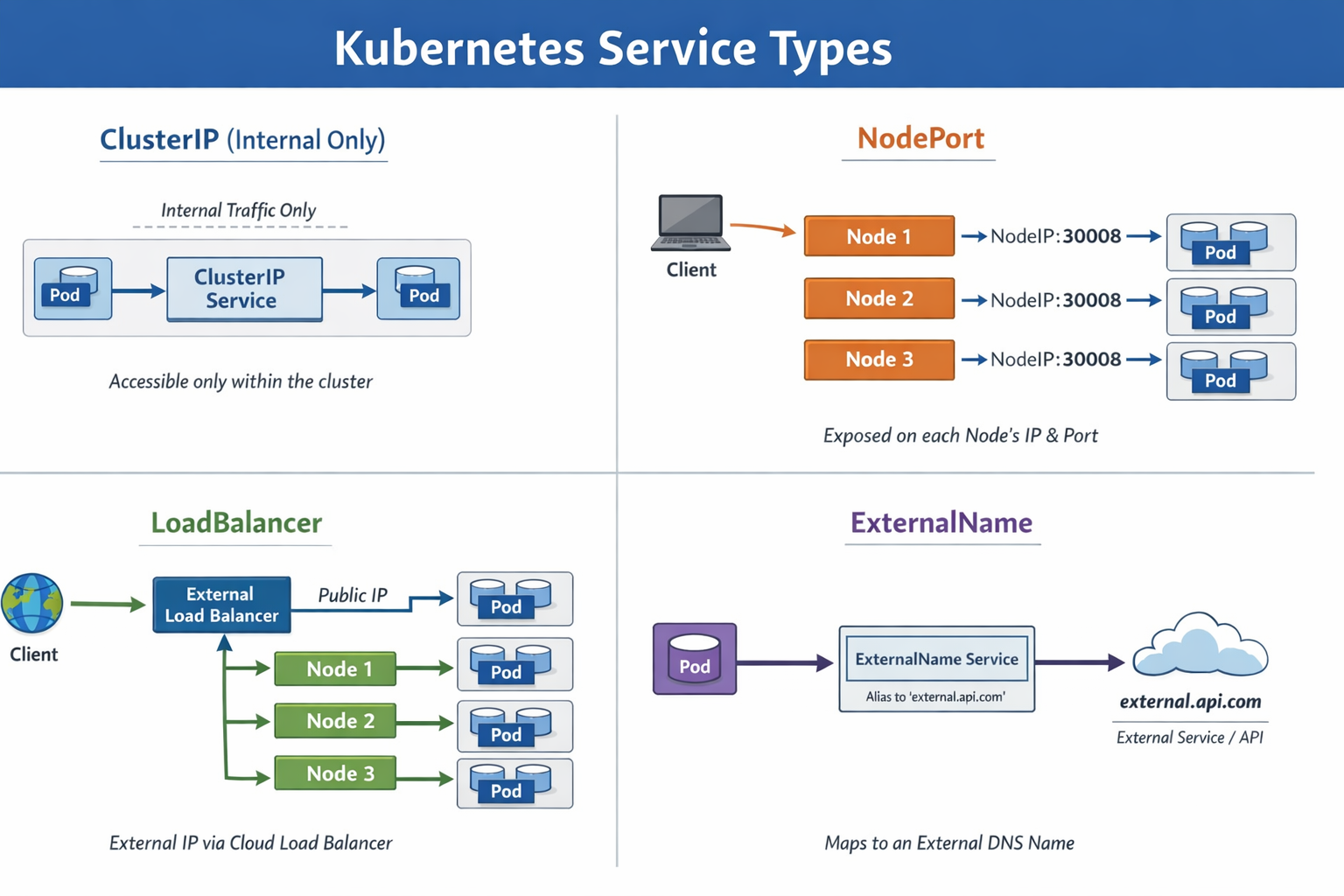 Type of Service LB L4
#ClusterIP (Default)
Expose Service di cluster-internal IP. Service hanya accessible dalam cluster.
Use case: Internal communication antara microservice
#NodePort
Expose Service di setiap Node's IP di static port. Make Service accessible dari outside cluster.
Use case: Development, testing, atau saat LoadBalancer unavailable
#LoadBalancer
Expose Service externally menggunakan cloud provider's load balancer.
Use case: Production external access di cloud environment
#ExternalName
Map Service ke external DNS name.
Use case: Access external service dengan Kubernetes DNS
#Membuat ClusterIP Service
ClusterIP adalah default Service type untuk internal cluster communication.
#Contoh 1: Basic ClusterIP Service
Pertama, buat Deployment:

apiVersion: apps/v1
kind: Deployment
metadata:
    name: nginx-deployment
spec:
    replicas: 3
    selector:
        matchLabels:
            app: nginx
    template:
        metadata:
            labels:
                app: nginx
        spec:
            containers:
                - name: nginx
                  image: nginx:1.25
                  ports:
                      - containerPort: 80
Apply Deployment:
sudo kubectl apply -f nginx-deployment.ymlBuat ClusterIP Service:
apiVersion: v1
kind: Service
metadata:
    name: nginx-service
spec:
    type: ClusterIP
    selector:
        app: nginx
    ports:
        - protocol: TCP
          port: 80
          targetPort: 80
Apply Service:
sudo kubectl apply -f nginx-service-clusterip.ymlVerify Service:
sudo kubectl get service nginx-serviceOutput:
NAME            TYPE        CLUSTER-IP      EXTERNAL-IP   PORT(S)   AGE
nginx-service   ClusterIP   10.43.100.50    <none>        80/TCP    30s
Service mendapat stable ClusterIP (10.43.100.50) yang tidak akan berubah.
#Testing ClusterIP Service
Test Service dari dalam cluster:
# Buat test Pod
sudo kubectl run test-pod --image=curlimages/curl:latest --rm -it -- sh

# Di dalam Pod, test Service
curl http://nginx-service
curl http://nginx-service.default.svc.cluster.local
Service load balance request across semua tiga nginx Pod.
#Service Discovery dengan DNS
Kubernetes otomatis membuat DNS record untuk Service.
#DNS Format
Service bisa diakses menggunakan DNS name ini:
Dalam same namespace:
<service-name>Dari different namespace:
<service-name>.<namespace>Fully qualified domain name (FQDN):
<service-name>.<namespace>.svc.cluster.local#Contoh: DNS Service Discovery
apiVersion: v1
kind: Service
metadata:
    name: backend
    namespace: production
spec:
    selector:
        app: backend
    ports:
        - port: 8080
          targetPort: 8080
Frontend Pod bisa access Service ini menggunakan:
backend(jika di same namespace)backend.production(dari different namespace)backend.production.svc.cluster.local(FQDN)
#Membuat NodePort Service
NodePort expose Service di setiap Node's IP di static port (30000-32767).
#Contoh: NodePort Service
apiVersion: v1
kind: Service
metadata:
    name: nginx-nodeport
spec:
    type: NodePort
    selector:
        app: nginx
    ports:
        - protocol: TCP
          port: 80
          targetPort: 80
          nodePort: 30080
Apply Service:
sudo kubectl apply -f nginx-service-nodeport.ymlVerify:
sudo kubectl get service nginx-nodeportOutput:
NAME             TYPE       CLUSTER-IP      EXTERNAL-IP   PORT(S)        AGE
nginx-nodeport   NodePort   10.43.100.51    <none>        80:30080/TCP   30s
Access Service dari outside cluster:
curl http://<node-ip>:30080Important
Penting: NodePort Service accessible di SEMUA node di cluster, meskipun Pod tidak running di node tersebut. Kubernetes route traffic ke appropriate node.
#Membuat LoadBalancer Service
LoadBalancer membuat external load balancer (di supported cloud environment).
#Contoh: LoadBalancer Service
apiVersion: v1
kind: Service
metadata:
    name: nginx-loadbalancer
spec:
    type: LoadBalancer
    selector:
        app: nginx
    ports:
        - protocol: TCP
          port: 80
          targetPort: 80
Apply Service:
sudo kubectl apply -f nginx-service-loadbalancer.ymlVerify:
sudo kubectl get service nginx-loadbalancerOutput (di cloud environment):
NAME                 TYPE           CLUSTER-IP      EXTERNAL-IP      PORT(S)        AGE
nginx-loadbalancer   LoadBalancer   10.43.100.52    203.0.113.10     80:31234/TCP   2m
EXTERNAL-IP adalah public IP yang disediakan oleh cloud load balancer.
Note
Catatan: LoadBalancer type require cloud provider support (AWS, GCP, Azure). Di local cluster seperti Minikube atau K3s, kalian mungkin butuh MetalLB atau similar solution.
Jika kalian menggunakan K3s, secara default Service dengan tipe LoadBalancer akan otomatis dihandle oleh Klipper seperti ini
#Konfigurasi Port
Service support flexible port mapping:
#Port Field
ports:
    - protocol: TCP
      port: 80          # Service port (yang client connect ke)
      targetPort: 8080  # Pod port (dimana container listen)
nodePort: 30080 # Node port (untuk NodePort/LoadBalancer)- port: Port yang Service listen
- targetPort: Port di Pod (bisa port number atau name)
- nodePort: Port di setiap Node (NodePort/LoadBalancer saja)
#Contoh: Different Port Mapping
apiVersion: v1
kind: Service
metadata:
    name: api-service
spec:
    selector:
        app: api
    ports:
        - name: http
          protocol: TCP
          port: 80
          targetPort: 8080
        - name: https
          protocol: TCP
          port: 443
          targetPort: 8443
Service ini:
- Listen di port 80, forward ke Pod port 8080
- Listen di port 443, forward ke Pod port 8443
#Menggunakan Named Port
Define named port di Pod:
apiVersion: v1
kind: Pod
metadata:
    name: web-pod
    labels:
        app: web
spec:
    containers:
        - name: web
          image: nginx:1.25
          ports:
              - name: http
                containerPort: 80
              - name: metrics
                containerPort: 9090
Reference named port di Service:
apiVersion: v1
kind: Service
metadata:
    name: web-service
spec:
    selector:
        app: web
    ports:
        - name: http
          port: 80
          targetPort: http
        - name: metrics
          port: 9090
targetPort: metrics#Session Affinity
Kontrol apakah request dari same client pergi ke same Pod.
#ClientIP Session Affinity
apiVersion: v1
kind: Service
metadata:
    name: sticky-service
spec:
    selector:
        app: web
    sessionAffinity: ClientIP
    sessionAffinityConfig:
        clientIP:
            timeoutSeconds: 10800
    ports:
        - port: 80
          targetPort: 80
Dengan sessionAffinity: ClientIP, request dari same client IP pergi ke same Pod untuk specified timeout (default 10800 detik = 3 jam).
#Headless Service
Service tanpa ClusterIP, digunakan untuk direct Pod-to-Pod communication.
#Contoh: Headless Service
apiVersion: v1
kind: Service
metadata:
    name: database
spec:
    clusterIP: None
    selector:
        app: database
    ports:
        - port: 5432
          targetPort: 5432
Dengan clusterIP: None, DNS return Pod IP directly daripada Service IP.
Use case: StatefulSet dimana setiap Pod butuh stable identity.
#Service Tanpa Selector
Buat Service yang tidak otomatis select Pod.
#Contoh: Manual Endpoint
apiVersion: v1
kind: Service
metadata:
    name: external-database
spec:
    ports:
        - port: 5432
          targetPort: 5432
Manually buat Endpoint:
apiVersion: v1
kind: Endpoints
metadata:
    name: external-database
subsets:
    - addresses:
          - ip: 192.168.1.100
      ports:
          - port: 5432
Use case: Access external service atau database outside Kubernetes.
#ExternalName Service
Map Service ke external DNS name.
#Contoh: ExternalName Service
apiVersion: v1
kind: Service
metadata:
    name: external-api
spec:
    type: ExternalName
    externalName: api.example.com
Pod bisa access external-api yang resolve ke api.example.com.
Use case: Abstract external service URL, making it easy untuk change them later.
#Contoh Praktis
#Contoh 1: Microservices Architecture
Frontend, backend, dan database service:
# Frontend Service (LoadBalancer untuk external access)
apiVersion: v1
kind: Service
metadata:
    name: frontend
spec:
    type: LoadBalancer
    selector:
        app: frontend
    ports:
        - port: 80
          targetPort: 3000
---
# Backend Service (ClusterIP untuk internal access)
apiVersion: v1
kind: Service
metadata:
    name: backend
spec:
    type: ClusterIP
    selector:
        app: backend
    ports:
        - port: 8080
          targetPort: 8080
---
# Database Service (Headless untuk StatefulSet)
apiVersion: v1
kind: Service
metadata:
    name: database
spec:
    clusterIP: None
    selector:
        app: database
    ports:
        - port: 5432
targetPort: 5432#Contoh 2: Multi-Port Service
Application dengan HTTP dan metrics endpoint:
apiVersion: v1
kind: Service
metadata:
    name: app-service
spec:
    selector:
        app: myapp
    ports:
        - name: http
          port: 80
          targetPort: 8080
        - name: metrics
          port: 9090
          targetPort: 9090
        - name: health
          port: 8081
targetPort: 8081#Contoh 3: Environment-Specific Service
Different service untuk different environment:
# Production Service
apiVersion: v1
kind: Service
metadata:
    name: api
    namespace: production
spec:
    selector:
        app: api
        environment: production
    ports:
        - port: 80
          targetPort: 8080
---
# Staging Service
apiVersion: v1
kind: Service
metadata:
    name: api
    namespace: staging
spec:
    selector:
        app: api
        environment: staging
    ports:
        - port: 80
targetPort: 8080#Melihat Detail Service
#Get Service
sudo kubectl get servicesAtau shorthand:
sudo kubectl get svc#Describe Service
sudo kubectl describe service nginx-serviceOutput show:
Name:              nginx-service
Namespace:         default
Labels:            <none>
Annotations:       <none>
Selector:          app=nginx
Type:              ClusterIP
IP Family Policy:  SingleStack
IP Families:       IPv4
IP:                10.43.100.50
IPs:               10.43.100.50
Port:              <unset>  80/TCP
TargetPort:        80/TCP
Endpoints:         10.42.0.10:80,10.42.0.11:80,10.42.0.12:80
Session Affinity:  None
Events: <none>#View Endpoint
sudo kubectl get endpoints nginx-serviceOutput:
NAME            ENDPOINTS                                   AGE
nginx-service   10.42.0.10:80,10.42.0.11:80,10.42.0.12:80   5m
Show actual Pod IP yang Service route ke.
#Kesalahan Umum dan Pitfall
#Kesalahan 1: Selector Mismatch
Problem: Service selector tidak match Pod label.
Solusi: Ensure label match exactly:
# Pod label
labels:
    app: nginx
    version: v1

# Service selector harus match
selector:
    app: nginx
version: v1#Kesalahan 2: Wrong Target Port
Problem: targetPort tidak match container port.
Solusi: Verify container port:
sudo kubectl get pod <pod-name> -o jsonpath='{.spec.containers[*].ports[*].containerPort}'#Kesalahan 3: Menggunakan LoadBalancer Locally
Problem: LoadBalancer pending di local cluster.
Solusi: Gunakan NodePort untuk local development atau install MetalLB.
#Kesalahan 4: Tidak Check Endpoint
Problem: Service tidak punya endpoint.
Solusi: Check apakah Pod running dan label match:
sudo kubectl get endpoints <service-name>
sudo kubectl get pods -l app=<label>#Kesalahan 5: Lupa DNS Suffix
Problem: Tidak bisa access Service dari different namespace.
Solusi: Gunakan full DNS name:
<service-name>.<namespace>.svc.cluster.local#Best Practice
#Gunakan Meaningful Service Name
Pilih clear, descriptive name:
# Bagus
name: user-api
name: payment-service
name: database-primary

# Hindari
name: svc1
name: service
name: app#Selalu Set Resource Limit di Pod
Service route ke Pod, jadi ensure Pod punya resource limit:
resources:
    requests:
        memory: "256Mi"
        cpu: "250m"
    limits:
        memory: "512Mi"
cpu: "500m"#Gunakan Named Port
Make configuration lebih clear:
ports:
    - name: http
      port: 80
      targetPort: http
    - name: metrics
      port: 9090
targetPort: metrics#Implement Health Check
Ensure Service hanya route ke healthy Pod:
livenessProbe:
    httpGet:
        path: /health
        port: 8080
readinessProbe:
    httpGet:
        path: /ready
port: 8080#Gunakan ClusterIP untuk Internal Service
Jangan expose internal service unnecessarily:
# Internal microservice
type: ClusterIP

# Hanya expose yang butuh external access
type: LoadBalancer#Document Service Dependency
Add annotation documenting dependency:
metadata:
    annotations:
        description: "User API service"
        depends-on: "database, cache"
owner: "backend-team"#Penutup
Pada episode 18 ini, kita telah membahas Service di Kubernetes secara mendalam. Kita sudah belajar apa itu Service, different Service type, dan cara menggunakannya untuk reliable application networking.
Key takeaway:
- Service menyediakan stable endpoint untuk access Pod
- Empat type: ClusterIP (internal), NodePort (node access), LoadBalancer (external), ExternalName (DNS mapping)
- Menggunakan label selector untuk otomatis discover Pod
- Menyediakan load balancing across multiple Pod replica
- Enable service discovery via DNS
- ClusterIP adalah default dan paling umum untuk internal communication
- Port mapping allow Service port berbeda dari Pod port
- Session affinity enable sticky session
- Headless Service untuk direct Pod access
- Selalu verify selector match Pod label
- Check endpoint untuk ensure Service find Pod
Service adalah fundamental untuk Kubernetes networking, enable reliable communication antara application component. Dengan memahami Service, kalian bisa build robust, scalable microservices architecture dengan proper service discovery dan load balancing.
Bagaimana, makin jelas kan tentang Service di Kubernetes? Di episode 19 berikutnya, kita akan membahas Ingress, yang menyediakan sophisticated HTTP/HTTPS routing ke Service dengan feature seperti host-based routing, path-based routing, dan TLS termination. Jadi, pastikan tetap semangat belajar dan nantikan episode selanjutnya!