Belajar Kubernetes - Pengenalan dan Penjelasan GitOps
Di episode ini kita akan coba bahas GitOps untuk manage Kubernetes deployment menggunakan Git sebagai source of truth. Kita akan mempelajari GitOps principle, tool seperti ArgoCD dan Flux, dan best practice untuk implement GitOps workflow.


#Pendahuluan
Di episode sebelumnya, kita menjelajahi Kustomize, yang menyediakan declarative approach untuk customize Kubernetes manifest. Sekarang kita akan mendalami GitOps, yang menggunakan Git sebagai source of truth untuk Kubernetes deployment.
Catatan: Disini saya akan menggunakan Kubernetes Cluster yang di install melalui K3s.
GitOps adalah serangkaian practice yang menggunakan Git repository sebagai single source of truth untuk declarative infrastructure dan application. Daripada manually apply kubectl command, Anda commit desired state Anda ke Git, dan automated tool synchronize cluster Anda untuk match state tersebut. Pikirkan GitOps seperti Infrastructure as Code untuk Kubernetes - seluruh cluster configuration Anda live di Git.
#Memahami GitOps
GitOps didasarkan pada empat core principle:
1. Declarative
Seluruh system Anda dijelaskan secara declarative di Git.
2. Versioned dan Immutable
Semua change tracked di Git dengan full history.
3. Pulled Automatically
Automated tool pull change dari Git dan apply ke cluster.
4. Continuously Reconciled
Cluster state continuously dibandingkan dengan Git dan di-reconcile.
#Mengapa GitOps Penting
1. Single Source of Truth
Git adalah authoritative source untuk semua cluster state.
2. Audit Trail
Setiap change tracked dengan commit history.
3. Easy Rollback
Revert ke any previous state dengan revert Git commit.
4. Collaboration
Tim collaborate melalui pull request dan code review.
5. Automation
Continuous deployment tanpa manual intervention.
6. Disaster Recovery
Recreate entire cluster dari Git.
#GitOps Workflow
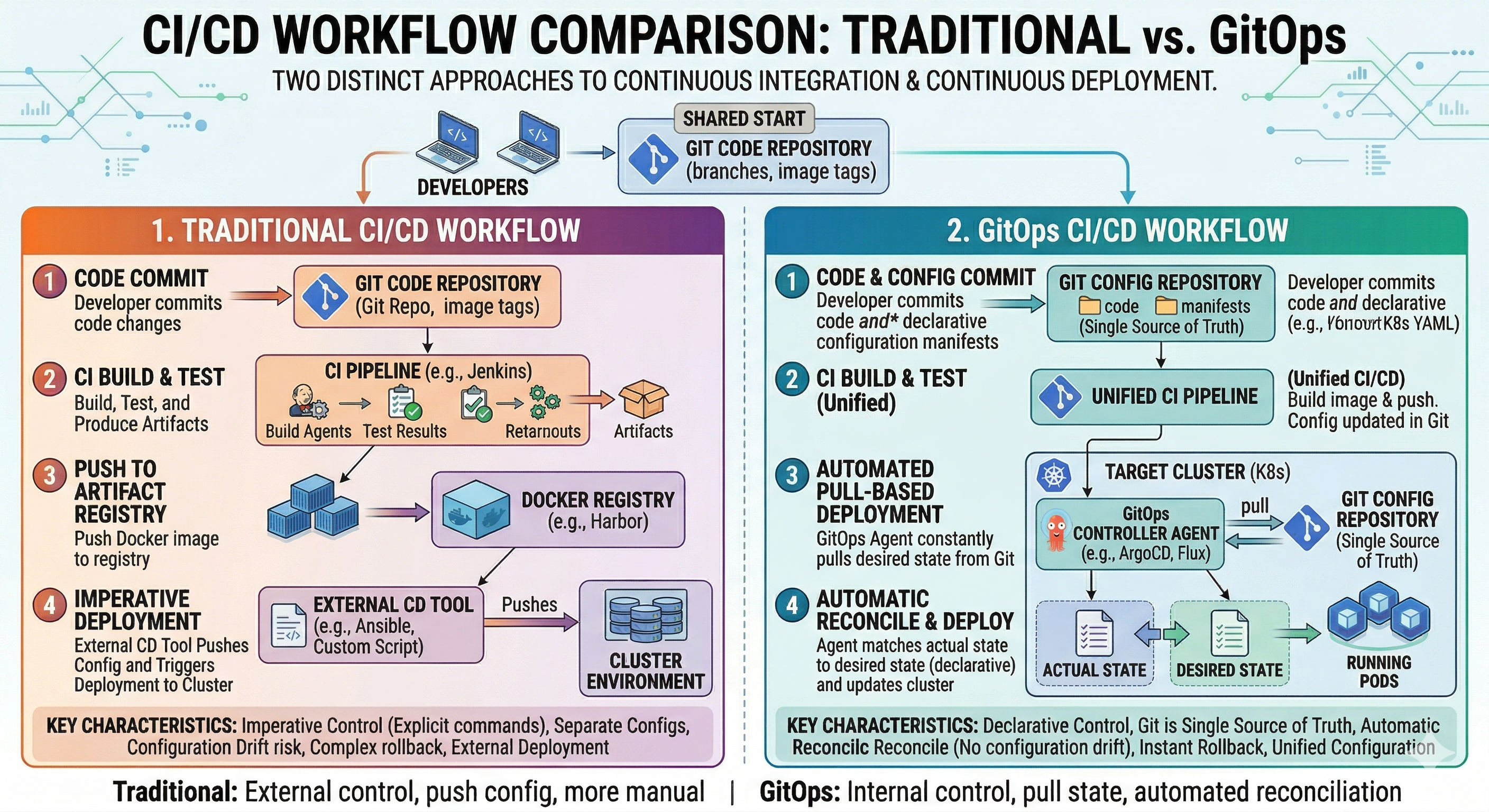 Traditional vs GitOps
#Traditional Deployment
Developer → kubectl apply → ClusterManual, error-prone, no audit trail.
#GitOps Deployment
Developer → Git Commit → GitOps Tool → ClusterAutomated, auditable, reproducible.
#GitOps Flow
- Developer commit change ke Git
- CI/CD pipeline validate change
- GitOps tool detect change
- GitOps tool apply change ke cluster
- Cluster state match Git state
#GitOps Tool
#ArgoCD
ArgoCD adalah declarative, GitOps continuous delivery tool untuk Kubernetes.
Installation

kubectl create namespace argocd
kubectl apply -n argocd -f https://raw.githubusercontent.com/argoproj/argo-cd/stable/manifests/install.yaml
Access ArgoCD UI
kubectl port-forward svc/argocd-server -n argocd 8080:443Get Initial Password
kubectl -n argocd get secret argocd-initial-admin-secret -o jsonpath="{.data.password}" | base64 -d#Flux
Flux adalah tool untuk keep Kubernetes cluster di sync dengan source dari configuration.
Installation
curl -s https://fluxcd.io/install.sh | sudo bash
flux install
Bootstrap dari Git
flux bootstrap github \
  --owner=your-username \
  --repository=fleet-infra \
  --branch=main \
  --path=./clusters/my-cluster \
--personal#GitOps Repository Structure
#Typical Structure
gitops-repo/
├── clusters/
│   ├── dev/
│   │   ├── kustomization.yaml
│   │   └── apps/
│   ├── staging/
│   │   ├── kustomization.yaml
│   │   └── apps/
│   └── production/
│       ├── kustomization.yaml
│       └── apps/
├── apps/
│   ├── web-app/
│   │   ├── base/
│   │   └── overlays/
│   └── api-app/
│       ├── base/
│       └── overlays/
└── infrastructure/
    ├── networking/
    ├── storage/
└── monitoring/#Example Repository
apiVersion: kustomize.config.k8s.io/v1beta1
kind: Kustomization

resources:
  - ../../apps/web-app/overlays/production
  - ../../apps/api-app/overlays/production
- ../../infrastructure/monitoringapiVersion: kustomize.config.k8s.io/v1beta1
kind: Kustomization
bases:
- ../../base
namespace: production
replicas:
- name: web-app
count: 3
images:
- name: web-app
newTag: "v1.0.0"
commonLabels:
environment: production#ArgoCD Application
#Basic Application
apiVersion: argoproj.io/v1alpha1
kind: Application
metadata:
  name: web-app
  namespace: argocd
spec:
  project: default
  source:
    repoURL: https://github.com/your-org/gitops-repo
    targetRevision: main
    path: apps/web-app/overlays/production
  destination:
    server: https://kubernetes.default.svc
    namespace: production
  syncPolicy:
    automated:
      prune: true
      selfHeal: true
    syncOptions:
- CreateNamespace=true#Application dengan Multiple Source
apiVersion: argoproj.io/v1alpha1
kind: Application
metadata:
  name: full-stack
  namespace: argocd
spec:
  project: default
  sources:
  - repoURL: https://github.com/your-org/gitops-repo
    targetRevision: main
    path: apps/web-app/overlays/production
  - repoURL: https://github.com/your-org/gitops-repo
    targetRevision: main
    path: apps/api-app/overlays/production
  destination:
    server: https://kubernetes.default.svc
    namespace: production
  syncPolicy:
    automated:
      prune: true
selfHeal: true#Flux Kustomization
#Basic Kustomization
apiVersion: kustomize.toolkit.fluxcd.io/v1
kind: Kustomization
metadata:
  name: web-app
  namespace: flux-system
spec:
  interval: 10m
  sourceRef:
    kind: GitRepository
    name: gitops-repo
  path: ./apps/web-app/overlays/production
  prune: true
wait: true#Git Repository Source
apiVersion: source.toolkit.fluxcd.io/v1
kind: GitRepository
metadata:
  name: gitops-repo
  namespace: flux-system
spec:
  interval: 1m
  url: https://github.com/your-org/gitops-repo
  ref:
    branch: main
  secretRef:
name: git-credentials#GitOps Workflow Example
#1. Developer Make Change
# Edit deployment
vim apps/web-app/overlays/production/kustomization.yaml

# Commit change
git add apps/web-app/overlays/production/kustomization.yaml
git commit -m "Increase web-app replicas to 5"
git push origin main#2. GitOps Tool Detect Change
ArgoCD atau Flux automatically detect Git commit.
#3. GitOps Tool Apply Change
# ArgoCD sync automatically
argocd app sync web-app

# Atau Flux reconcile automatically
flux reconcile kustomization web-app#4. Cluster State Updated
Cluster di-update untuk match Git state.
#Pull Request Workflow
#1. Create Feature Branch
git checkout -b feature/increase-replicas#2. Make Change
# Update configuration
vim apps/web-app/overlays/production/kustomization.yaml#3. Create Pull Request
git push origin feature/increase-replicas
# Create PR di GitHub#4. Review dan Approve
Tim review change di PR.
#5. Merge ke Main
# After approval, merge PR
git merge feature/increase-replicas
git push origin main#6. GitOps Tool Sync
GitOps tool automatically apply change ke cluster.
#Contoh Praktis
#Multi-Environment Setup
apiVersion: kustomize.config.k8s.io/v1beta1
kind: Kustomization

resources:
  - ../../apps/web-app/overlays/dev
  - ../../apps/api-app/overlays/dev

namespace: devapiVersion: kustomize.config.k8s.io/v1beta1
kind: Kustomization
resources:
- ../../apps/web-app/overlays/production
- ../../apps/api-app/overlays/production
namespace: production#ArgoCD Application per Environment
apiVersion: argoproj.io/v1alpha1
kind: Application
metadata:
  name: dev-cluster
  namespace: argocd
spec:
  project: default
  source:
    repoURL: https://github.com/your-org/gitops-repo
    targetRevision: main
    path: clusters/dev
  destination:
    server: https://kubernetes.default.svc
  syncPolicy:
    automated:
      prune: true
selfHeal: trueapiVersion: argoproj.io/v1alpha1
kind: Application
metadata:
name: prod-cluster
namespace: argocd
spec:
project: default
source:
repoURL: https://github.com/your-org/gitops-repo
targetRevision: main
path: clusters/production
destination:
server: https://kubernetes.default.svc
syncPolicy:
automated:
prune: true
selfHeal: true#Kesalahan dan Jebakan Umum
#Kesalahan 1: Mixing Manual dan GitOps
Problem: Beberapa change applied manually, yang lain melalui GitOps.
# JANGAN LAKUKAN INI - Manual change bypass GitOps
kubectl apply -f deployment.yaml
kubectl set image deployment/web-app web-app=myapp:2.0Solusi: Semua change melalui Git:
# Update Git
vim apps/web-app/overlays/production/kustomization.yaml
git commit -m "Update image ke 2.0"
git push#Kesalahan 2: Not Protecting Main Branch
Problem: Siapa pun dapat push langsung ke main.
Solusi: Require pull request dan review:
# Require pull request review
# Require status check untuk pass
# Require branch untuk up to date#Kesalahan 3: Storing Secret di Git
Problem: Sensitive data exposed di Git.
# JANGAN LAKUKAN INI - Secret di Git
apiVersion: v1
kind: Secret
metadata:
  name: db-secret
data:
password: c2VjcmV0MTIz # base64 encodedSolusi: Gunakan secret management tool:
# Gunakan ArgoCD Sealed Secret atau External Secret Operator
# Store secret di external vault#Kesalahan 4: Not Testing Change
Problem: Broken configuration deployed ke production.
Solusi: Test sebelum merge:
# Validate YAML
kustomize build apps/web-app/overlays/production

# Run test
kubectl apply -k apps/web-app/overlays/production --dry-run=client#Kesalahan 5: Ignoring Sync Status
Problem: Cluster drift dari Git state.
Solusi: Monitor sync status:
# Check ArgoCD sync status
argocd app get web-app

# Check Flux reconciliation
flux get kustomization web-app#Praktik Terbaik
#1. Gunakan Pull Request untuk Semua Change
# Jangan pernah push langsung ke main
git checkout -b feature/my-change
# Make change
git push origin feature/my-change
# Create PR, get review, merge#2. Protect Main Branch
- Require pull request review
- Require status check untuk pass
- Require branch untuk up to date
#3. Gunakan Separate Repository
gitops-repo/
├── clusters/
├── apps/
└── infrastructure/#4. Implement Proper RBAC
apiVersion: v1
kind: ConfigMap
metadata:
  name: argocd-rbac-cm
  namespace: argocd
data:
  policy.default: role:readonly
  policy.csv: |
    p, role:admin, applications, *, */*, allow
    p, role:dev, applications, get, dev/*, allow
g, developers, role:dev#5. Monitor dan Alert
# Monitor sync status
argocd app list

# Check untuk drift
argocd app diff web-app

# Set up alert untuk sync failure#6. Gunakan GitOps untuk Infrastructure Juga
gitops-repo/
├── infrastructure/
│   ├── networking/
│   ├── storage/
│   └── monitoring/
├── apps/
└── clusters/#7. Document Semuanya
# GitOps Repository

## Structure

- `clusters/` - Cluster configuration
- `apps/` - Application configuration
- `infrastructure/` - Infrastructure configuration

## Workflow

1. Create feature branch
2. Make change
3. Create pull request
4. Get review
5. Merge ke main
6. GitOps tool sync automatically#GitOps vs Traditional Deployment
| Aspek | GitOps | Traditional |
|---|---|---|
| Source of Truth | Git | Manual command |
| Audit Trail | Full Git history | Limited log |
| Rollback | Git revert | Manual |
| Collaboration | Pull request | Ad-hoc |
| Automation | Continuous | Manual |
| Disaster Recovery | Git clone | Manual restore |
| Compliance | Auditable | Difficult |
#Monitoring GitOps
#ArgoCD Monitoring
# Check application status
argocd app list
argocd app get web-app

# Check sync status
argocd app sync web-app

# View application detail
argocd app info web-app#Flux Monitoring
# Check reconciliation status
flux get kustomization
flux get helmrelease

# Check source status
flux get source git

# View reconciliation log
flux logs --all-namespaces --follow#Kesimpulan
Pada episode 40 ini, kita telah membahas GitOps di Kubernetes secara mendalam. Kita sudah belajar GitOps principle, tool seperti ArgoCD dan Flux, dan best practice untuk implement GitOps workflow.
Key takeaway:
- GitOps gunakan Git sebagai source of truth untuk cluster state
- Declarative - Seluruh system dijelaskan di Git
- Versioned - Semua change tracked dengan history
- Pulled Automatically - Tool sync cluster ke Git state
- Continuously Reconciled - Cluster state selalu match Git
- ArgoCD - Declarative continuous delivery tool
- Flux - Tool untuk keep cluster di sync
- Pull Request Workflow - Change reviewed sebelum deployment
- Multi-Environment - Manage dev, staging, production dari Git
- Audit Trail - Full history dari semua change
- Easy Rollback - Revert ke any previous state
- Disaster Recovery - Recreate cluster dari Git
- Collaboration - Tim work melalui pull request
- Automation - Continuous deployment tanpa manual intervention
- Single Source of Truth - Git adalah authoritative
GitOps transform bagaimana Anda manage Kubernetes deployment dengan membuat Git single source of truth dan automating synchronization.