Catatan: Pada artikel ini saya menggunakan PowerDNS Versi 4.5.3,
munkgin jika kalian berbeda versi, akan ada konfigurasi nama yang berbeda
seperti pada versi 4.5.0 ke atas nama konfigurasi master dan slave dirubah menjadi
primary dan secondary
Pastikan kalian sesuaikan konfigurasi kalian dengan versi yang sama, untuk mengetahui nya
kalian bisa mengunjungi dokumentasi resmi dari powerdns disini
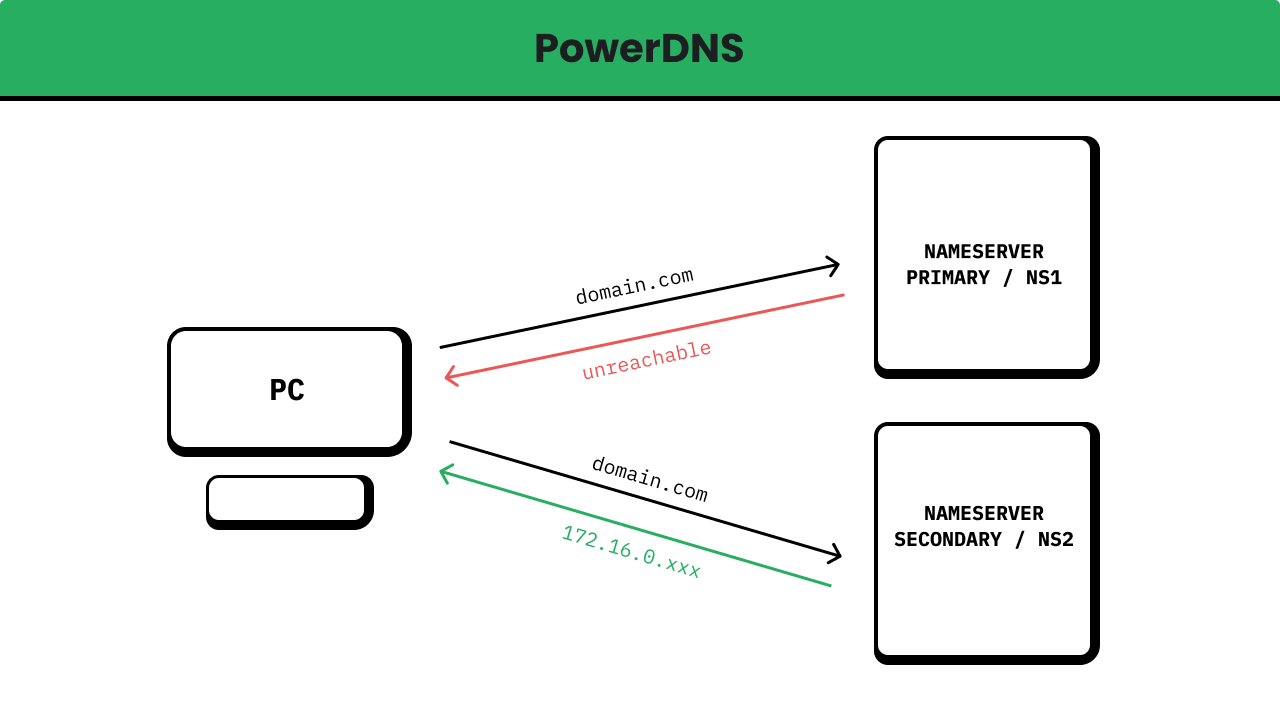
Master: Adalah server yang bertanggung jawab atas zona DNS yang sebenarnya atau asli. Ini adalah server di mana zona DNS didefinisikan dan diperbarui secara langsung. Master server mengatur informasi zona dan mengotorisasi perubahan pada zona tersebut. Ketika ada perubahan pada zona DNS, master server akan mengirimkan atau mengirim notifikasi pembaruan ke server slave yang terhubung.
Slave: Adalah server yang menduplikasi atau menyalin zona DNS dari master server. Slave server menerima pembaruan zona dari master server dan menyimpan salinan zona tersebut. Ini memungkinkan slave server untuk melayani permintaan DNS tanpa harus menghubungi master server siap kali. Slave server berfungsi sebagai cadangan dan dapat menggantikan master jika master server tidak tersedia.
Dengan menggunakan konfigurasi master dan slave, Anda dapat mencapai beberapa manfaat, diantaranya seperti:
Redundansi: Jika master server mengalami kegagalan, slave server dapat menggantikannya dan melanjutkan pelayanan DNS tanpa gangguan.
Skalabilitas: Dengan adanya slave server, beban akses ke zona DNS dapat dibagi di antara beberapa server, mengurangi beban pada master server.
Pembaruan yang efisien: Slave server hanya menerima pembaruan zona dari master srver, sehingga mengurangi lalu lintas jaringan yang diperlukan untuk memperbarui informasi zona.
Lokalisasi: Dengan menyimpan salinan zona secara lokal, slave server dapat merespons permintaan DNS dengan cepat tanpa harus mengandalkan koneksi jaringan ke master server.
Dalam konfigurasi master-slave, sinkronisasi antara server master dan slave dapat dilakukan menggunakan protokol transfer zona seperti AXFR (Asynchronous Transfer of Zone) atau metode yang lebih modern seperti IXFR (Incremental Transfer of Zone). Metode sinkronisasi ini memastikan bahwa salinan zona di slave server tetap terkini dengan master server.
Catatan: Pada beberapa kasus atau konfigurasi untuk melakukan transfer zone atau AXFR ada juga yang menggunakan replicant database, sehingga kedua server powerdns di setting sebagai master namun yang melakukan penyesuaian data adalah database nya itu sendiri.
Setelah kalian menyiapkan 2 OS yang terinstall PowerDNS, selanjutnya kalian tentukan server mana yang akan menjadi master atau primary dan server mana yang akan menjadi slave atau secondary.
Disini saya akan menentukan server nya, sebagai berikut:
Setelah kalian menentukan server mana yang akan menjadi master dan mana yang akan menjadi slave, langkah selanjutnya disini adalah melakukan konfigurasi untuk server master.
Untuk melakukannya, kalian masuk terlebih dahulu kedalam server nya menggunakan SSH. Setelah itu buka konfigurasi powerdns menggunakan text editor di lokasi atau PATH /etc/powerdns/pdns.conf.
Catatan: Alangkah baiknya sebelum menambahkan atau memasukan konfigurasi berikut, lakukan backup terhadap konfigurasi yang sudah ada dengan cara
Catatan: Perhatikan beberapa konfigurasi dibawah ini:
gmysql-host
gmysql-port
gmysql-dbname
gmysql-user
gmysql-password
local-address
api-key
webserver-address
webserver-allow-from
webserver-password
allow-axfr-ips
also-notify
default-soa-content
Sesuaikan dengan konfigurasi yang kalian gunakan.
/etc/powerdns/pdns.conf
# |--------------------------------------------------------------------------# | Section: Backend# |--------------------------------------------------------------------------# |# | This section contain of backend configuration information such as# | - launch (backend service)# | - g[backend]-host (ip address bind of backend service running)# | - g[backend]-port (port bind of backend service running)# | - g[backend]-dbname (database name for powerdns )# | - g[backend]-user (username for authentication of database)# | - g[backend]-password (password for authentication of database)# | - g[backend]-dnssec (dnssec domain)# |launch=gmysqlgmysql-host=<YOUR_DATABASE_IP>gmysql-port=<YOUR_DATABASE_PORT>gmysql-dbname=<YOUR_DATABASE_NAME>gmysql-user=<YOUR_DATABASE_USERNAME>gmysql-password=<YOUR_DATABASE_PASSWORD>gmysql-dnssec=yes# |--------------------------------------------------------------------------# | Section: Local Bind# |--------------------------------------------------------------------------# |# | This section contain of local bind configuration information such as# | - local-address (ip address will bind powerdns service)# | - local-port (port will bind powerdns service)# |local-address=127.0.0.1,<YOUR_IP_PRIVATE>,<YOUR_IP_PUBLIC>local-port=53# |--------------------------------------------------------------------------# | Section: API# |--------------------------------------------------------------------------# |# | This section contain of API configuration such as# | - api (state for API service will be running or not)# | - api-key (if API service running, key must be set)# |api=yesapi-key=<YOUR_SECRET_KEY># |--------------------------------------------------------------------------# | Section: Webserver# |--------------------------------------------------------------------------# |# | This section contain of Webserver configuration such as# | - webserver (state for Webserver service will be running or not)# | - webserver-address (if webserver running, ip address must be set for bind the service)# | - webserver-port (if webserver running, port must be set for bind the service)# | - webserver-allow-from (this configuration is ACL for webserver)# | - webserver-password (this configuration is password for webserver when someone open)# |webserver=yeswebserver-address=<YOUR_IP_PRIVATE>webserver-port=8081webserver-allow-from=127.0.0.1,<YOUR_IP_PRIVATE_NETWORK/MASK>webserver-password=<YOUR_WEB_SERVER_PASSWORD># |--------------------------------------------------------------------------# | Section: Master or Primary# |--------------------------------------------------------------------------# |# | This section contain of PowerDNS configuration act as Master or Primary such as# | - primary (changed since version 4.5.0, this called master before version 4.5.0, this will set powerdns act as 'master' or 'primary')# | - secondary (changed since version 4.5.0, this called slave before version 4.5.0, this will set powerdns act as 'slave' or 'secondary')# | - allow-axfr-ips (this will whitelist servers are allowed or authorized to receive zone transfer from the master)# | - allow-notify-from (this will receive AXFR notify, default is 0.0.0.0/0 which mean all anyone in the world can send# | the AXFR notify to this server, if you don't want to receive AXFR notify from anyone you can# | fill with empty string)# | - also-notify (if you want to send AXFR notify to another server like 'slave' you can fill with specify ip address of the server,# | even if this ip address is not match the list in `only-notify`)# | - only-notify (if you want to send AXFR notify to another server like `slave` you can fill with subnetmask of network the server)# | - secondary-do-renotify (this setting will make PowerDNS renotify the secondaries after an AXFR is received from a primary.# | This is useful, among other situations, when running a signing secondary)# |primary=yessecondary=noallow-axfr-ips=<YOUR_IP_SLAVE>allow-notify-from=also-notify=<YOUR_IP_SLAVE>only-notify=secondary-do-renotify=yes# |--------------------------------------------------------------------------# | Section: Optional Configuration# |--------------------------------------------------------------------------# |# | This section contain of Optional configuration such as# | - daemon (enable for `production` and disable for `development` this will be running powerdns on the background proccess)# | - guardian (enable for `production` and disable for `development` this will manage the powerdns, like monitoring, restart the service# | if something shit happen, manage resource, logging and reporting)# | - default-soa-content (this configuration will use SOA content when create a new zone)# | - log-dns-details (this will send the informative DNS details be sent to syslog e.g /var/log/syslog. If set to 'no' will improve# | performance, so enable for `development` and disable for `production`)# | - log-dns-queries (this will send to log all incoming DNS queries. This will lead to a lot of logging! Only enable for debugging!)# | - loglevel (this will send to log all incoming DNS queries. This will lead to a lot of logging! Only enable for debugging!# | loglevel=5 #default is 4, amount of logging, the higher number, the more lines logged. Corresponds to 'syslog' level# | values (e.g: 0 = emergency, 1 = alert, 2 = critical, 3 = error, 4 = warning, 5 = notice, 6 = info, 7 = debug). Each# | level includes itself plus the lower levels before it. Not recommended to set this below 3)# | - setgid, setuid (this both configuration concern to Security of PowerDNS, By specifying 'setuid' and 'setgid', PowerDNS change to# | this identity shortly after binding to the privileged DNS Ports. These options are highly recommended. It is# | suggested that a seperate identity is created for PowerDNS as the user 'nobody' is in fact quite powerful on most# | systems. Both these parameters can be specified either numerically or as real names. Set these parameters immediately# | if they are not set!)# | - distributor-threads (number of Distributor (backend) threads to start per receiver thread)# | - receiver-threads (number of receiver (listening) threads to start)# | - signing-threads (tell powerdns how many threads to use for signing. It might help improve signing speed by changing this number.)# | - version-string (When queried for its version over DNS `dig chaos txt version.bind @pdns.ip_address`, PowerDNS normally responds# | truthfully. With this setting you can overrule what will be returned. Set version-string to full to get default# | behaviour, to powerdns to just make it state `Served by PowerDNS - https://www.powerdns.com/`. The anonymous# | setting will return a ServFail, much like Microsoft nameservers do. You can set this response to a custom# | value as well.)# |daemon=noguardian=nodefault-soa-content=ns1.devnull.co.id arman.devnull.co.id 0 10800 3600 604800 3600log-dns-details=yeslog-dns-queries=yesloglevel=5setgid=pdnssetuid=pdnsdistributor-threads=4receiver-threads=3signing-threads=4version-string=DNS Local As Master or Primary By Arman
Setelah sebelumnya melakukan konfigurasi di sisi master, sekarang lakukan konfigurasi di sisi slave dengan cara yang sama yaitu masuk menggunakan SSH kedalam server. Setelah itu buka konfigurasi powerdns menggunakan text editor di lokasi atau PATH /etc/powerdns/pdns.conf
Catatan: Alangkah baiknya sebelum menambahkan atau memasukan konfigurasi berikut, lakukan backup terhadap konfigurasi yang sudah ada dengan cara
Catatan: Perhatikan beberapa konfigurasi dibawah ini:
gmysql-host
gmysql-port
gmysql-dbname
gmysql-user
gmysql-password
local-address
api-key
webserver-address
webserver-allow-from
webserver-password
allow-dnsupdate-from
allow-notify-from
default-soa-content
Sesuaikan dengan konfigurasi yang kalian gunakan.
/etc/powerdns/pdns.conf
# |--------------------------------------------------------------------------# | Section: Backend# |--------------------------------------------------------------------------# |# | This section contain of backend configuration information such as# | - launch (backend service)# | - g[backend]-host (ip address bind of backend service running)# | - g[backend]-port (port bind of backend service running)# | - g[backend]-dbname (database name for powerdns )# | - g[backend]-user (username for authentication of database)# | - g[backend]-password (password for authentication of database)# | - g[backend]-dnssec (dnssec domain)# |launch=gmysqlgmysql-host=<YOUR_DATABASE_IP>gmysql-port=<YOUR_DATABASE_PORT>gmysql-dbname=<YOUR_DATABASE_NAME>gmysql-user=<YOUR_DATABASE_USERNAME>gmysql-password=<YOUR_DATABASE_PASSWORD>gmysql-dnssec=yes# |--------------------------------------------------------------------------# | Section: Local Bind# |--------------------------------------------------------------------------# |# | This section contain of local bind configuration information such as# | - local-address (ip address will bind powerdns service)# | - local-port (port will bind powerdns service)# |local-address=127.0.0.1,<YOUR_IP_PRIVATE>,<YOUR_IP_PUBLIC>local-port=53# |--------------------------------------------------------------------------# | Section: API# |--------------------------------------------------------------------------# |# | This section contain of API configuration such as# | - api (state for API service will be running or not)# | - api-key (if API service running, key must be set)# |api=yesapi-key=<YOUR_SECRET_KEY># |--------------------------------------------------------------------------# | Section: Webserver# |--------------------------------------------------------------------------# |# | This section contain of Webserver configuration such as# | - webserver (state for Webserver service will be running or not)# | - webserver-address (if webserver running, ip address must be set for bind the service)# | - webserver-port (if webserver running, port must be set for bind the service)# | - webserver-allow-from (this configuration is ACL for webserver)# | - webserver-password (this configuration is password for webserver when someone open)# |webserver=yeswebserver-address=<YOUR_IP_PRIVATE>webserver-port=8081webserver-allow-from=127.0.0.1,<YOUR_IP_PRIVATE_NETWORK/MASK>webserver-password=<YOUR_WEB_SERVER_PASSWORD># |--------------------------------------------------------------------------# | Section: Master or Primary# |--------------------------------------------------------------------------# |# | This section contain of PowerDNS configuration act as Master or Primary such as# | - primary (changed since version 4.5.0, this called master before version 4.5.0, this will set powerdns act as 'master' or 'primary')# | - secondary (changed since version 4.5.0, this called slave before version 4.5.0, this will set powerdns act as 'slave' or 'secondary')# | - allow-dnsupdate-from (allow DNS updates from this ip ranges)# | - allow-axfr-ips (this will whitelist servers are allowed or authorized to receive zone transfer from the master)# | - allow-notify-from (this will receive AXFR notify, default is 0.0.0.0/0 which mean all anyone in the world can send# | the AXFR notify to this server, if you don't want to receive AXFR notify from anyone you can# | fill with empty string)# | - also-notify (if you want to send AXFR notify to another server like 'slave' you can fill with specify ip address of the server,# | even if this ip address is not match the list in `only-notify`)# | - only-notify (if you want to send AXFR notify to another server like `slave` you can fill with subnetmask of network the server)# | - secondary-do-renotify (this setting will make PowerDNS renotify the secondaries after an AXFR is received from a primary.# | This is useful, among other situations, when running a signing secondary)# |secondary=yesautosecondary=yesprimary=noallow-dnsupdate-from=<YOUR_IP_MASTER>allow-notify-from=<YOUR_IP_MASTER>only-notify=# |--------------------------------------------------------------------------# | Section: Optional Configuration# |--------------------------------------------------------------------------# |# | This section contain of Optional configuration such as# | - daemon (enable for `production` and disable for `development` this will be running powerdns on the background proccess)# | - guardian (enable for `production` and disable for `development` this will manage the powerdns, like monitoring, restart the service# | if something shit happen, manage resource, logging and reporting)# | - default-soa-content (this configuration will use SOA content when create a new zone)# | - log-dns-details (this will send the informative DNS details be sent to syslog e.g /var/log/syslog. If set to 'no' will improve# | performance, so enable for `development` and disable for `production`)# | - log-dns-queries (this will send to log all incoming DNS queries. This will lead to a lot of logging! Only enable for debugging!)# | - loglevel (this will send to log all incoming DNS queries. This will lead to a lot of logging! Only enable for debugging!# | loglevel=5 #default is 4, amount of logging, the higher number, the more lines logged. Corresponds to 'syslog' level# | values (e.g: 0 = emergency, 1 = alert, 2 = critical, 3 = error, 4 = warning, 5 = notice, 6 = info, 7 = debug). Each# | level includes itself plus the lower levels before it. Not recommended to set this below 3)# | - setgid, setuid (this both configuration concern to Security of PowerDNS, By specifying 'setuid' and 'setgid', PowerDNS change to# | this identity shortly after binding to the privileged DNS Ports. These options are highly recommended. It is# | suggested that a seperate identity is created for PowerDNS as the user 'nobody' is in fact quite powerful on most# | systems. Both these parameters can be specified either numerically or as real names. Set these parameters immediately# | if they are not set!)# | - distributor-threads (number of Distributor (backend) threads to start per receiver thread)# | - receiver-threads (number of receiver (listening) threads to start)# | - signing-threads (tell powerdns how many threads to use for signing. It might help improve signing speed by changing this number.)# | - version-string (When queried for its version over DNS `dig chaos txt version.bind @pdns.ip_address`, PowerDNS normally responds# | truthfully. With this setting you can overrule what will be returned. Set version-string to full to get default# | behaviour, to powerdns to just make it state `Served by PowerDNS - https://www.powerdns.com/`. The anonymous# | setting will return a ServFail, much like Microsoft nameservers do. You can set this response to a custom# | value as well.)# |daemon=noguardian=nodefault-soa-content=ns1.devnull.co.id arman.devnull.co.id 0 10800 3600 604800 3600log-dns-details=yeslog-dns-queries=yesloglevel=5setgid=pdnssetuid=pdnsdistributor-threads=4receiver-threads=3signing-threads=4version-string=DNS Local As Slave or Secondary By Arman
Setelah melakukan konfigurasi dari 2 sisi yaitu master dan slave, selanjutnya restart service powerdns dengan perintah:
NS1 / Master / Primary
user@ns1
sudo systemctl restart pdns
NS2 / Slave / Secondary
user@ns2
sudo systemctl restart pdns
Setelah service powerdns di restart, selanjutnya tambahkan zone dan record pada server master, maka master akan otomatis mengirim notifikasi AXFR ke server slave.
Catatan: Apabila server master tak kunjung mengirim notifikasi AXFR ke server slave, jalankan perintah berikut:
root@ns1
pdns_control notify <domain.tld>
Untuk menambahkan zone dan record nya, kalian bisa melihat video dibawah ini.
Atau jika kalian ingin menggunakan CLI bisa ikuti langkah-langkah berikut:
Membuat zone baru
root@ns1
pdnsutil create-zone <domain.tld>
Mengedit zone kemudian menambahkan record baru
root@ns1
pdnsutil edit-zone <domain.tld>
Isikan dengan format seperti berikut ini:
Domain Zone
<domain.tld> 3600 IN SOA ns1.domain.tld contact.domain.tld YYYYMMDD01 10800 3600 604800 3600<domain.tld> 3600 IN NS ns1.domain.tld<domain.tld> 3600 IN NS ns2.domain.tld
Setelah itu save dan exit.
Memberitahu notifikasi AXFR kepada slave dengan perintah: