#Project Overview
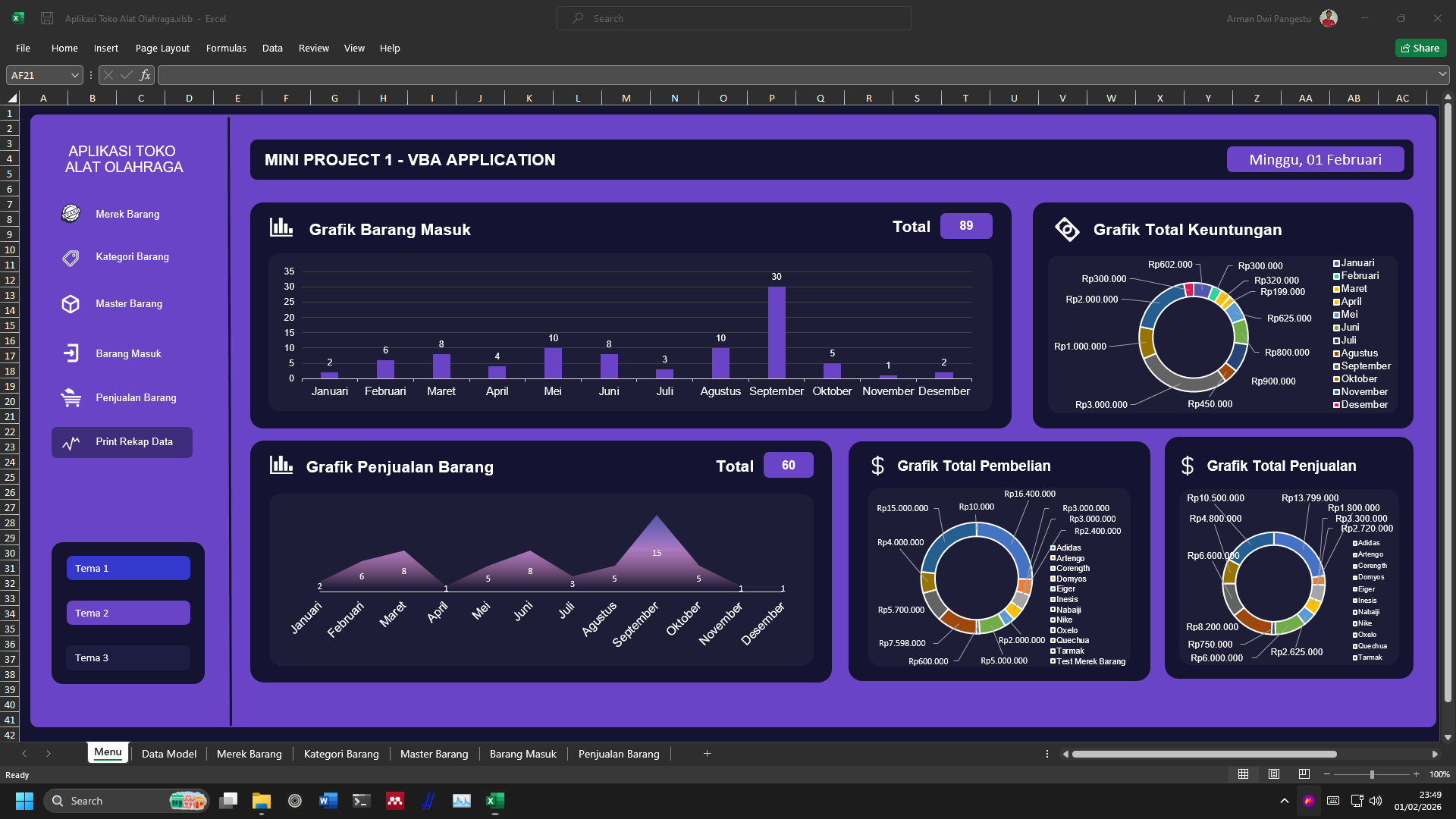
VBA Sports Equipment Store is a simple application built on Microsoft Excel using Visual Basic for Applications (VBA). This application simulates a sports equipment store management system with core features such as CRUD operations, transactions, reporting, and stock management — all running entirely inside Excel.
This project demonstrates that Excel is not only a static spreadsheet tool, but can also be extended into a simple desktop application by implementing business logic through VBA (macros).
#Background & Motivation
This project was created as part of an academic assignment for the Mini Project 1 course. At that time, I learned for the first time that:
Excel can be programmed using code through VBA (Visual Basic for Applications).
This discovery opened a new perspective for me, as I previously viewed Excel only as a tool for manual data entry, not as an application platform.
Through this assignment, I was challenged to:
- Build an application using Excel
- Implement CRUD logic using VBA
- Manage data similarly to a simple desktop application
#Project Goals
The primary goal of this project was learning, specifically to:
- Understand the fundamentals of VBA programming
- Apply CRUD concepts (Create, Read, Update, Delete)
- Build a structured Excel-based application workflow
- Connect UI elements (Excel Forms) with worksheet data
This project served as an early exercise in building data-driven applications, even though it used a non-traditional platform like Excel.
#Core Features
The application includes several core features:
#Dashboard
- Main interface as the central navigation hub
- Provides access to all primary features
#Data & Stock Management
- Input sports equipment product data
- Update and delete existing records
- Manage product stock levels
#Transactions
- Simulated sales transactions
- Automatic stock reduction
- Transaction data stored directly in Excel worksheets
#Reports
- Transaction summaries
- Stock information
- Simple reports generated from Excel-based data
#Technology Used
This project was built using:
-
Microsoft Excel
- Serves as the application platform
- Data storage using worksheets
-
Visual Basic for Applications (VBA)
- Application logic
- Event handling
- CRUD operations
- Bridge between UI components and data
No external database was used — all data is stored and managed directly within the Excel file.
#What I Learned
From this project, I gained several important foundational learnings, including:
- Introduction to VBA and Excel macros
- Event-driven programming concepts
- Implementing CRUD in a simple application
- Separating UI, logic, and data (at a basic level)
- Understanding that non-programming tools can be extended with code
This project became one of my early experiences in realizing that programming can be applied across many platforms, not only web or traditional desktop environments.
#Project Limitations
Since this project was built for academic and learning purposes, it has several limitations:
- Fully dependent on Microsoft Excel
- Not designed for large-scale or multi-user usage
- Code structure is relatively simple and procedural
- No external database integration
These limitations align with the project’s goal as a learning exercise.
#Why This Project Matters
Although simple, this project is important in my journey because it:
- Is one of my earliest academic application-based projects
- Represents my first experience programming with Excel
- Expanded my perspective on software development
- Demonstrated that useful software solutions can come from unexpected tools
#Conclusion
VBA Sports Equipment Store is a learning-focused project that helped me understand the fundamentals of VBA programming and data-driven application development using Excel.
This project represents an early exploration phase in my software engineering journey, where I began to realize that programming can be applied to many platforms — even tools that initially appear simple, such as Excel.
For implementation details, code structure, and the complete Excel files, please refer directly to this project’s repository on GitHub.